
Average, Max and Min are most commonly used in Excel and it’s quite handy to use this function combined with other calculations.
Let’s learn different types of Max, Min & Average DAX functions.
- MAX()
- MAXA()
- MAXX()
- MIN()
- MINA()
- MINX()
- AVERAGE()
- AVERAGEA()
- AVERAGEX()
The concept is same for all.
MAXX() , MINX() & AVERAGEX() will be able to eavluate a calculation expression like Sales * 0.5 or Qty * Unit Price
MAX()
As the name says, it returns the largest numeric value in a column.
Note:
- It should be column name or neasure you created.
- It returns a decimal number.
- It can be used t o find max number or dates.
- Empty celss, logical values, text are ignored.
Syntax : MAX (column name)Max = MAX('financials updated'[Units Sold])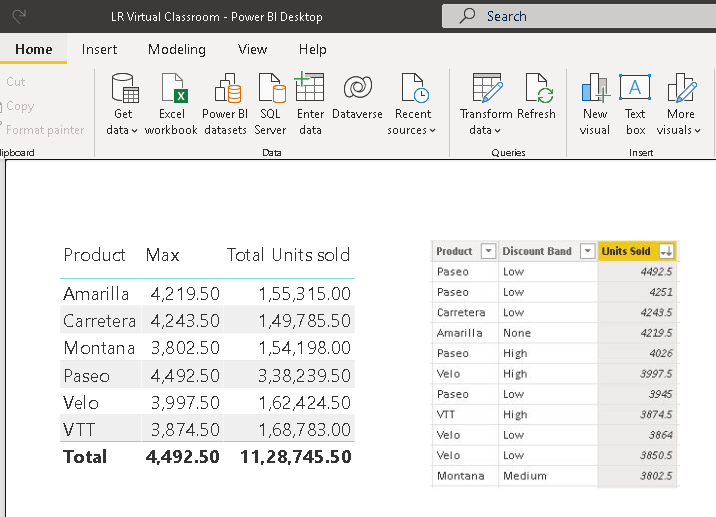
Example 2:
If you want to calculate the max of units sold and not filtered for any column except product, then use the below formula.
This will retun the max value for each product and not affected by Product filter. Hence allexcept product is used.
Whereas, max function is affected when you filter country, as shown below.
MAX with filter = CALCULATE(MAX('financials updated'[Units Sold]),ALLEXCEPT('financials updated','financials updated'[Product]))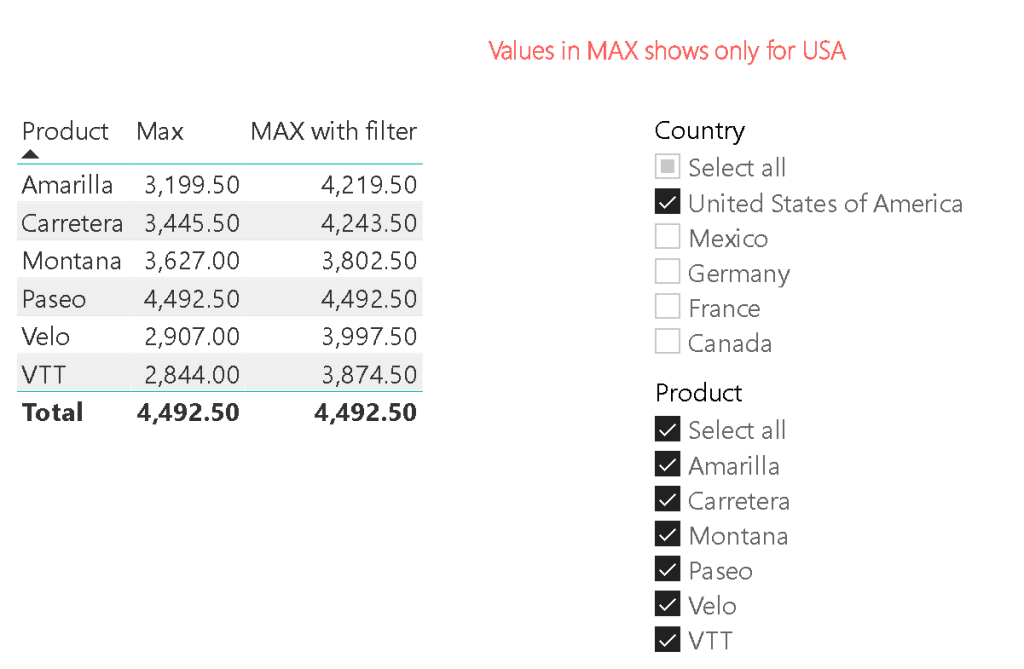
MAXA()
Returns the largest value in a column. The main difference is it takes logical values. True is counted as 1 and False is counted as 0.
Empty celss are ignored.
Synatx : MAXA (column name)MAXA = MAXA('financials updated'[Date])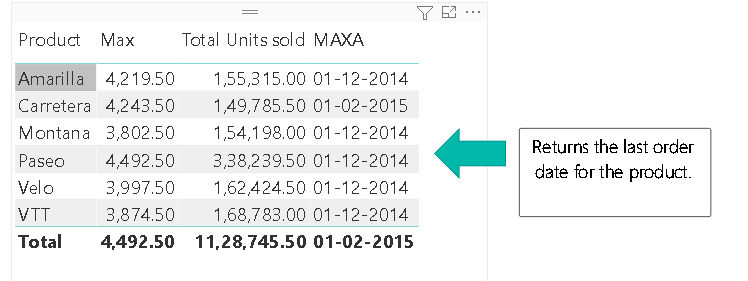
MAXX()
Evaluates an expression for each row of a table and returns the largest numeric value
Syntax : MAXX ( table, expression)It returns 0 if the expression doen not evaluate to numbers.
Empty cells, logical values, text values are returned as 0.
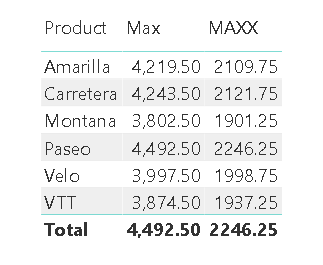
You cannot use masure or max function within MAXX(). It should be only column name. Here I have taken the unites sold and multipled by 0.5.
MAXX = MAXX('financials updated','financials updated'[Units Sold]*0.5)The MAX measures are only to be used as part of other function, as the total values, as it does not give the rigth total values for this function as below.
Max & Min date Calculation:
MIN date = CALCULATE(MIN('financials updated'[Date]),ALLSELECTED('financials updated'[Date]))MAXx Date = CALCULATE(Max('financials updated'[Date]),ALLSELECTED('financials updated'[Date]))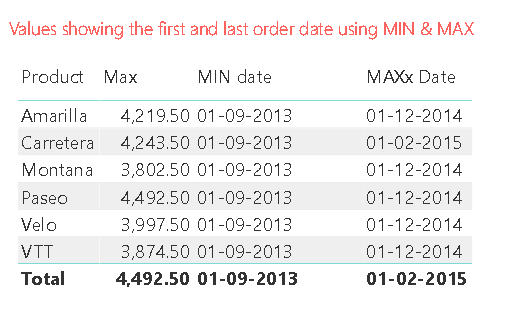
No. of weeks between Max and Min date:
No of weeks = DATEDIFF(Min('financials updated'[Date]),MAX('financials updated'[Date]),WEEK)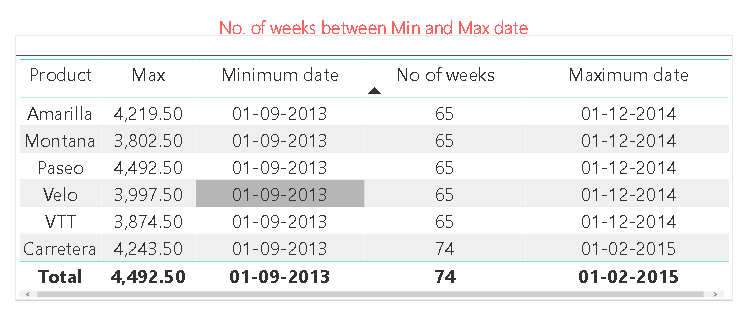
AVERAGE()
Returns the average (arithmetic mean) of all the numbers in a column.
Syntax: AVERAGE (column name)Notes:
If the column has 0 value, it is counted as rows for the divisor.
If the column contains logical values or empty cells, those values are ignored and rows are not counted.
It returns 0, if none of the rows meet the specified criteria.
AVERAGA()
In DAX, there are no differences between AVERAGEA and AVERAGE.
Returns the average (arithmetic mean) of the values in a column. Handles text and nonnumeric values.
The AVERAGEA function takes a column and averages the numbers in it and handles nonnumeric data types according to the following rules:
Values that evaluate to TRUE count as 1.
Values that evaluate to FALSE count as 0 (zero).
Values that contain non-numeric text count as 0 (zero).
Empty text (“”) counts as 0 (zero).
AVERAGEX()
Calculates the average (arithmetic mean) of a set of expressions evaluated over a table
Syntax: AVERAGEX (table name, expression)Thats a wrap about the Max, Min and Average DAX functions.
Discover more from LR Virtual Classroom
Subscribe to get the latest posts sent to your email.
 LR Virtual Classroom