Most Power BI report designers who work on business intelligence projects use Power BI Desktop to create Power BI reports, and then use the Power BI service to collaborate and distribute their reports.
How to Install Power BI Desktop – 3 ways:
- Download from Microsoft Store – Link Here
- Download from Microsoft Website – Link here
- Download from Power BI Service – LinkHere (Select the Download icon from the upper right corner, and then select Power BI Desktop after login).
There are a few advantages to getting Power BI Desktop from the Microsoft Store:
Microsoft says that there are more advantages for downloading the Power BI Desktop from Store.
1.Automatic updates: Windows downloads the latest version automatically in the background as soon as it’s available, so your version will always be up to date.
2.Smaller downloads: Microsoft Store ensures only components that have changed in each update are downloaded to your machine, resulting in smaller downloads for each update.
3.Admin privilege isn’t required: When you download the package directly and install it, you must be an administrator for the installation to complete successfully. If you get Power BI Desktop from the Microsoft Store, admin privilege is not required.
4.IT roll-out enabled: Through the Microsoft Store for Business, you can more easily deploy, or roll out, Power BI Desktop to everyone in your organization
5.Language detection: The Microsoft Store version includes all supported languages, and checks the language used on your computer each time it’s launched.
Additionally, Power BI Desktop will no longer be supported on Windows 7 after January 31st, 2021. After that date, Power BI Desktop will be supported on Windows 8 or newer versions of Windows, for the most recent release of Power BI Desktop only.
Comparing Power BI Desktop and the Power BI service:
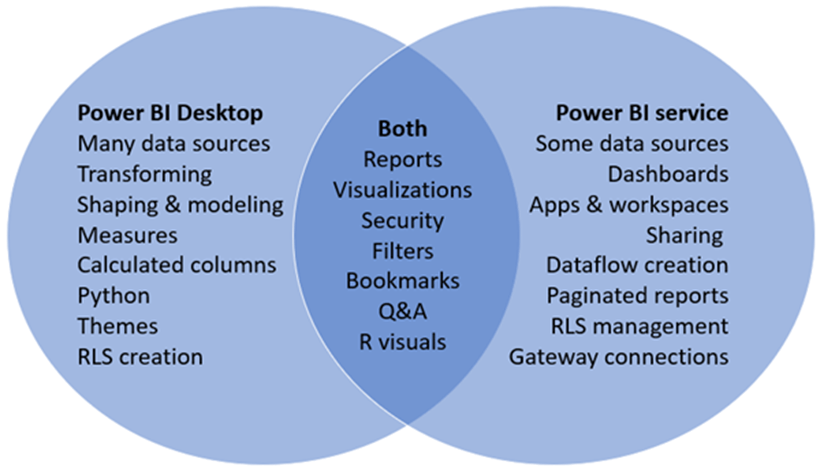
Power BI Desktop vs Power BI Service:
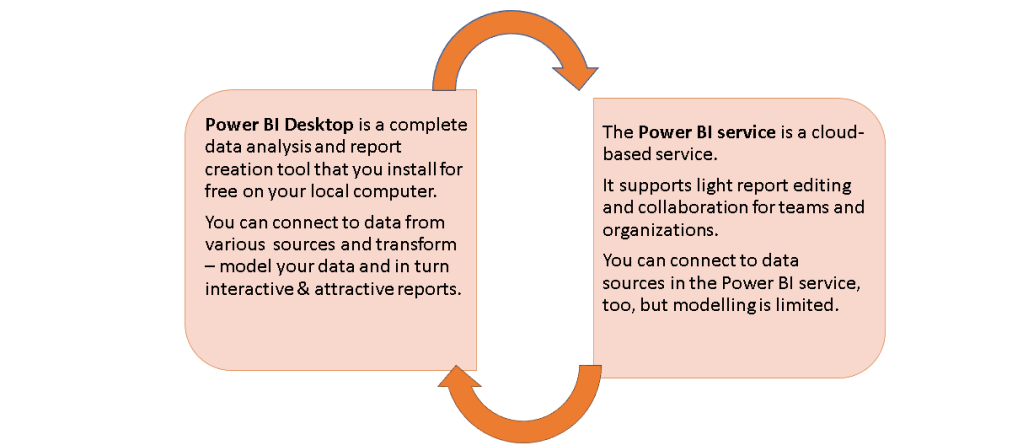
Power BI Desktop is the first step in Data Analytics.
Hope you found the post informative. Your valuable feedback, question, or comments about this post are always welcome by leaving me message on contact form is truly appreciated.
Addins (3) Advanced Excel (18) Agile (23) Blog (21) business (1) Clarity (3) Cloud Computing (3) Confluence (3) Dashboards (21) Data Analytics (17) Data modelling (9) DAX (17) Downloads (2) excel (1) GenAI (8) Jira (12) kanban (1) KPI (2) Loop (1) Motivation (3) MS Project (1) MS Teams (3) OneNote Tutorial (2) Outlook (1) PMO (72) Power BI (50) Power BI Dashboards (1) Power BI Desktop (28) Power BI service (2) Powerpoint (5) Power Query (3) Product Development (2) Productivity Tips & Tricks (59) project-management (4) Project Governance (2) Project Online (1) Ravindrapandian (1) Roadmap (2) scrum (5) scrum-master (2) Sharepoint Online (2) Smartsheet (5) Sway (1) Team Bonding (1)
Discover more from LR Virtual Classroom
Subscribe to get the latest posts sent to your email.
 LR Virtual Classroom