In this post, we are going to learn all the COUNT related DAX fuctions.
1 – COUNT()
The COUNT function counts the number of cells in a column that contain numbers.
Syntax: COUNT()
For example, The following example shows how to count the number of values in the column, ShipDate.
COUNT EX = COUNT(InvoiceDetails[InvoiceNumber])
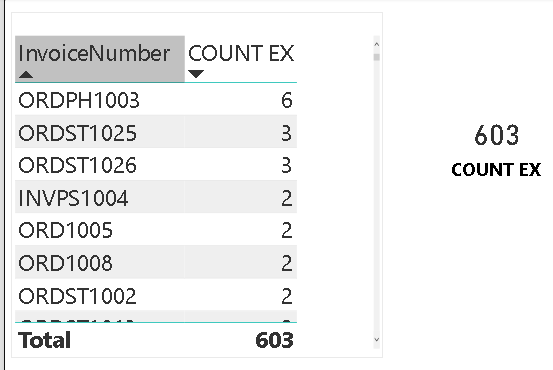
This counts the number fo values in the columns Shipdate. Remember , this is not counting distint values. It is counting number of rows.
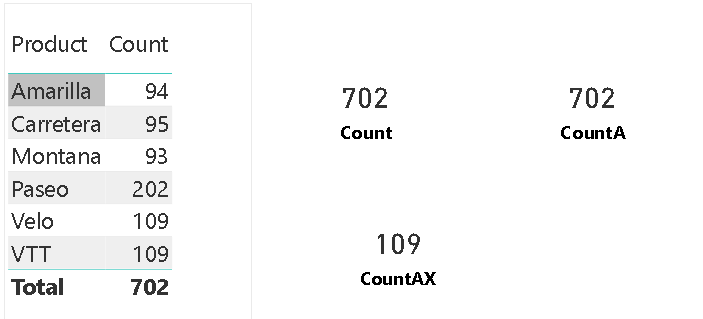
Another example, Count of Products = COUNT(‘financials updated'[Product]) returns the value 702.
The only argument allowed to this function is a column. You can use columns containing any type of data, but only numbers are counted.
The COUNT function counts rows that contain the following kinds of values:
- Numbers
- Dates
- Strings
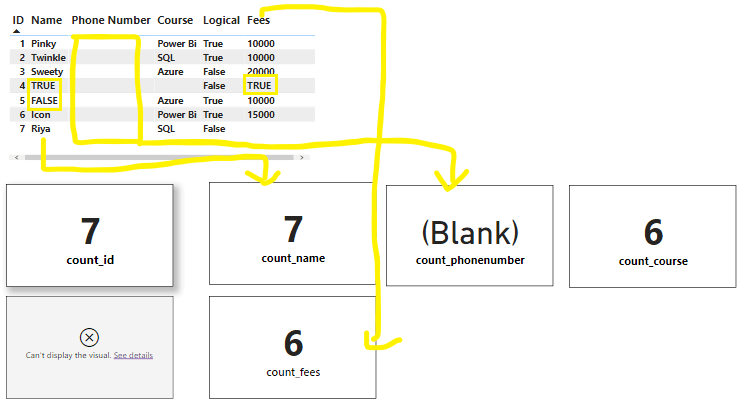
The Count function does not count boolean functions butIf you include true/false with categorical data and numerical values it will count. The only boolean values does not count.
2 – COUNTX Function (DAX)
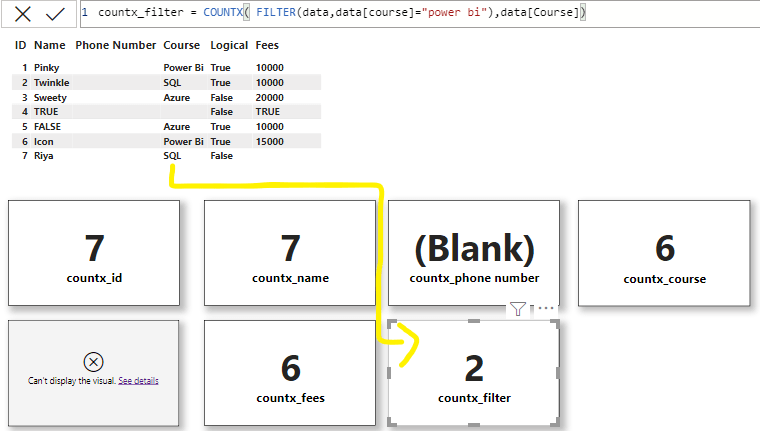
Counts the number of rows that contain a number or an expression that evaluates to a number, when evaluating an expression over a table.
Syntax: COUNTX(table, expression)
- The COUNTX function counts only numeric values or dates. Parameters that are logical values or text that cannot be translated into numbers are not counted.
- If the function finds no rows to count, it returns a blank. When there are rows, but none meets the specified criteria, then the function returns 0.
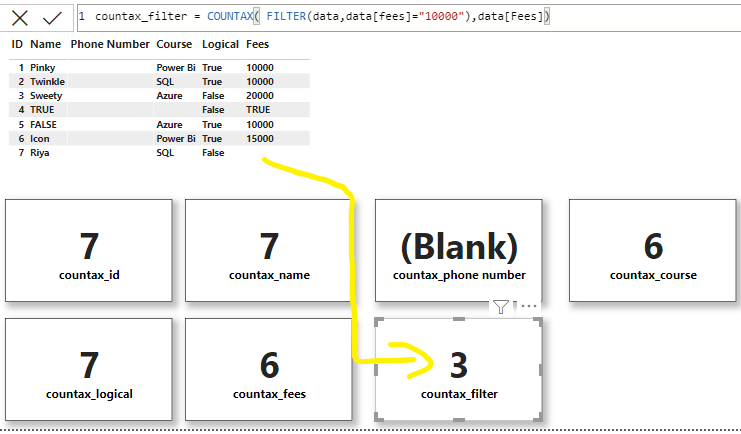
- If you want to count logical values, use the COUNTAX function.
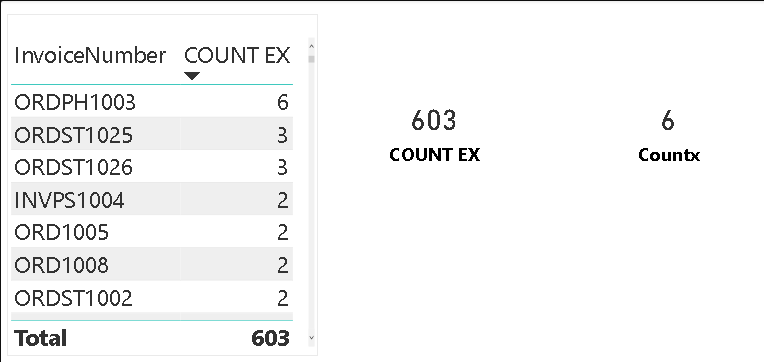
To find the count of unique invoice nuber,
Countx = COUNTX(FILTER(InvoiceDetails,InvoiceDetails[InvoiceNumber]=”ORDPH1003″),InvoiceDetails[InvoiceNumber])
Lets take another example,
3 – COUNTA Function (DAX)
The COUNTA function counts the number of cells in a column that are not empty.
Syntax: COUNTA()
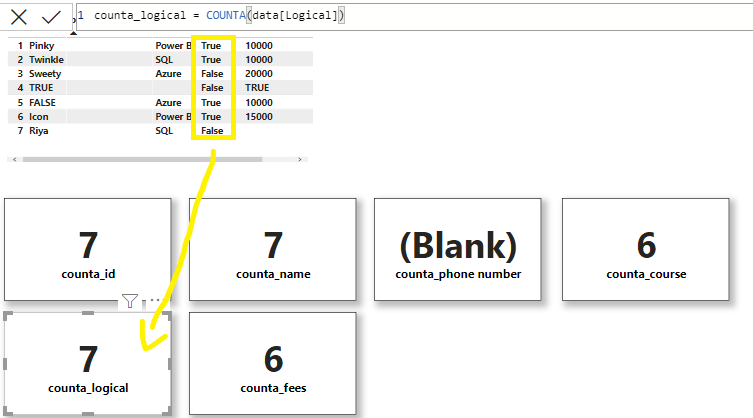
It counts not just rows that contain numeric values, but also rows that contain non-blank values, including text, dates, and logical values.
COUNT only counts cells containing numbers but COUNTA counts all cells that aren’t empty including logical boolean values.
PowerBI
Lets take another example for Counta()
4 – COUNTAX Function (DAX)
The COUNTAX function counts nonblank results when evaluating the result of an expression over a table.
It works just like the COUNTA function, but is used to iterate through the rows in a table and count rows where the specified expressions results in a non-blank result.
Syntax: COUNTAX(table(), expression)
The expression to be evaluated for each row of the table.
Lets take out example, CountAX = COUNTAX(FILTER(‘financials updated’,’financials updated'[Product]=”VTT”),’financials updated'[Product])
Lets take another example.
5 – COUNTBLANK Function (DAX)
Counts the number of blank cells in a column.
Syntax: COUNTBLANK()
If no rows are found that meet the condition, blanks are returned.
To count logical values or text, use the COUNTA or COUNTAX functions.
6 – COUNTROWS Function (DAX)
The COUNTROWS function counts the number of rows in the specified table, or in a table defined by an expression.
Syntax: COUNTROWS()
The name of the table that contains the rows to be counted, or an
expression that returns a table.
countrows = COUNTROWS(InvoiceDetails)
7 – DISTINCTCOUNT
Counts the number of distinct values in a column.
DISTINCTCOUNT(<column>)
The number of distinct values in column.
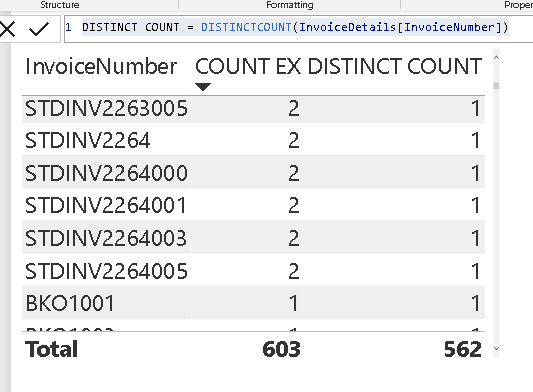
DISTINCT COUNT = DISTINCTCOUNT(InvoiceDetails[InvoiceNumber])
returns only the distinct count of columns. No duplicates. Only unique count of values in a result of column type.
- The only argument allowed to this function is a column.
- You can use columns containing any type of data.
- When the function finds no rows to count, it returns a BLANK, otherwise it returns the count of distinct values.
- DISTINCTCOUNT function includes the BLANK value. To skip the BLANK value, use the DISTINCTCOUNTNOBLANK function.
- This function is not supported for use in DirectQuery mode when used in calculated columns or row-level security (RLS) rules.
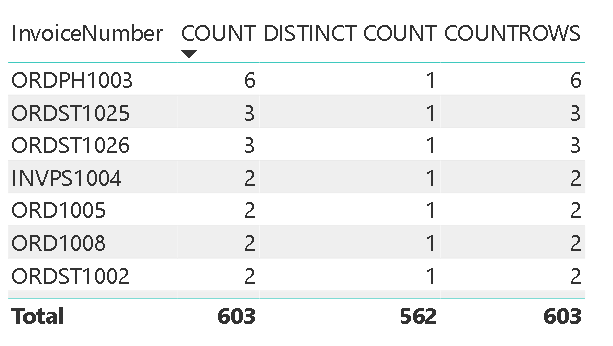
Difference between COUNT, COUNTROWS, DISTINCTCOUNT
Teh main differnce between count and countrows is that
You can use the COUNT function to count column values, or you can use the COUNTROWS function to count table rows.
Both functions will achieve the same result, providing that the counted column contains no BLANKs.
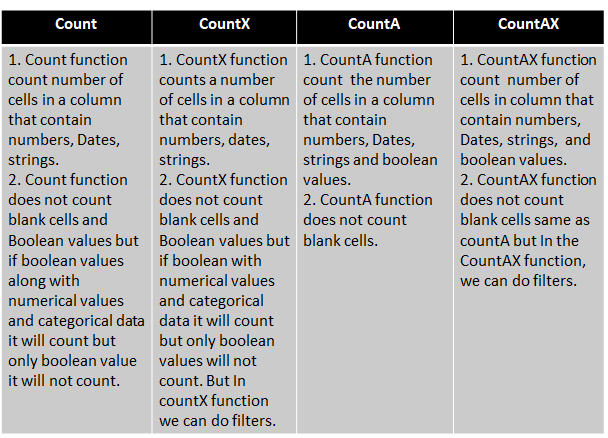
Difference between Count, CountX, CountA, CountAX
Discover more from LR Virtual Classroom
Subscribe to get the latest posts sent to your email.
 LR Virtual Classroom