We saw the basic level Date and Time DAX function here. Now, let’s deep dive into some more commonly used Date and Time functions.
- EDATE Function
- EOMONTH Function
- TIMEVALUE Function
- ENDOFMONTH Function
- ENDOFQUARTER Function
- ENDOFYEAR Function
- FIRSTDATE Function
- FIRSTNONBLANK Function
- LASTDATE Function
- LASTNONBLANK Function
EDATE Function:
This function returns the date that is the indicated number of months before or after the start date. In simple words, you can add a specified number of months to a date.
Use EDATE to calculate maturity dates or due dates that fall on the SAME DAY of the month as the date of issue.
SYNTAX:
EDATE(<start_date>, <months>)In contrast to Microsoft Excel, which stores dates as sequential serial numbers, DAX works with dates in a datetime format. Dates stored in other formats are converted implicitly.
This DAX function may return different results when used in a model that is deployed and then queried in DirectQuery mode.
EXAMPLE:
For example, the following functions: EDATE(“2009-01-29”, 1),
EDATE(“2009-01-30”, 1), EDATE(“2009-01-31”, 1) return February 28th of 2009; that corresponds to one month after the start date.
Due date Edate = EDATE("2015-1-1",1)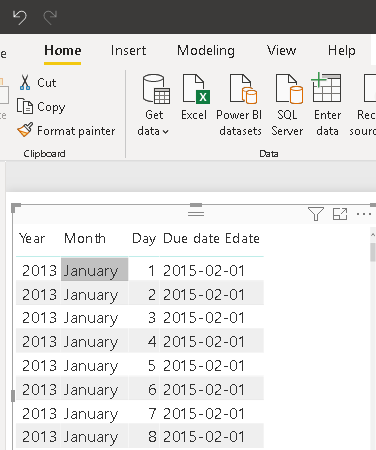
EOMONTH Function:
This function returns the date in datetime format of the last day of the month, before or after a specified number of months.
Use EOMONTH to calculate maturity dates or due dates that fall on the LAST DAY of the month.
SYNTAX:
EOMONTH(<start_date>, <months>)EXAMPLE:
=EOMONTH("March 3, 2021",1.5)The above expression returns May 31, 2021, because the month’s argument is rounded to 2.
Due date EOMONTH = EOMONTH("2015-1-1",2)
retunrs exactly last day after 2 months.
EOMONTH = EOMONTH('Calendar'[Calendar Date],1)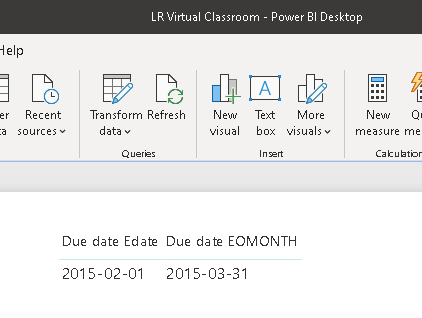
TIMEVALUE Function:
Converts a time in text format to a time in datetime format.
TIMEVALUE(hour,minute,second)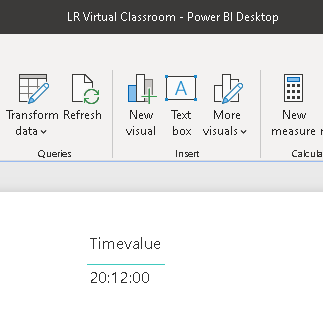
ENDOFMONTH Function:
This function returns the last date of the month in the current context for the specified column of dates.
ENDOFMONTH(<dates>)Endofmonth() = ENDOFMONTH('Calendar'[Calendar Date].[Date])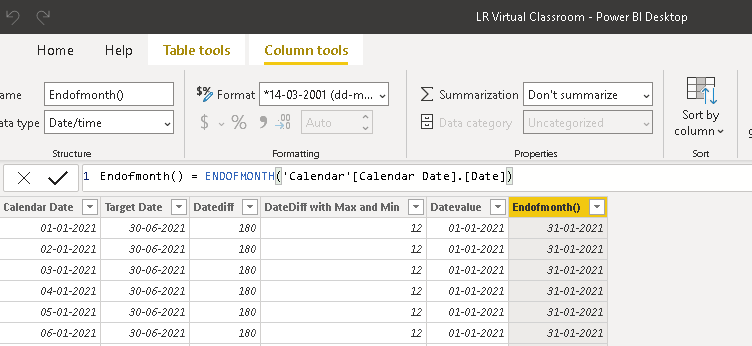
END OF QUARTER Function:
Returns the last date of the quarter in the current context for the specified column of dates.
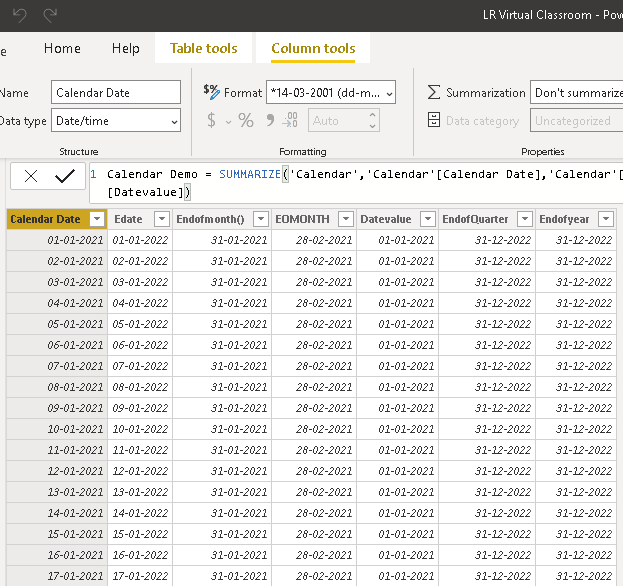
ENDOFQUARTER(<dates>)EndofQuarter = ENDOFQUARTER('Calendar'[Calendar Date].[Date])Dont forget to add “[Calendar Date].[Date])” in the syntax field.
ENDOFYEAR Function:
Returns the last date of the year in the current context for the specified column of dates.
ENDOFYEAR(<dates>)[,<year_end_date>])Endofyear = ENDOFYEAR('Calendar'[Calendar Date].[Date],2022)Dont forget to add “[Calendar Date].[Date])” in the syntax field.
FIRSTDATE Function:
Returns the first date in the current context for the specified column of dates.
Technically, the return value is a table that contains a single column and a single value. It can be used when you want to have constant date column.
Therefore, this function can be used as an argument to any function that requires a table in its arguments. Also, the returned value can be used whenever a date value is required.
FIRSTDATE(<dates>)Firstdate = FIRSTDATE('Calendar'[Calendar Date].[Date])
FIRSTNONBLANK Function
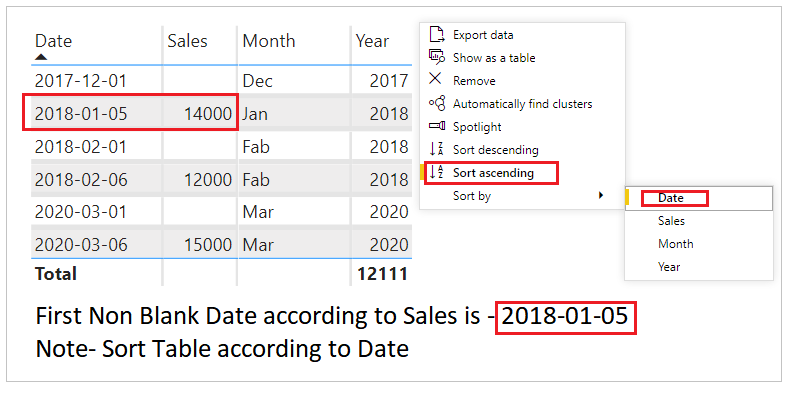
Returns the first value in the column, column, filtered by the current context, where the expression is not blank. This DAX function is not supported for use in DirectQuery mode.
Ths function is used if you want to find the first non blank value based on the expression.
FIRSTNONBLANK(<column>,<expression>)The column argument can be any of the following:
- • A reference to any column.
- • A table with a single column.
- • A Boolean expression that defines a single-column table .
FNB_Month = FIRSTNONBLANK(FNBDAX[Month],[Tot sales])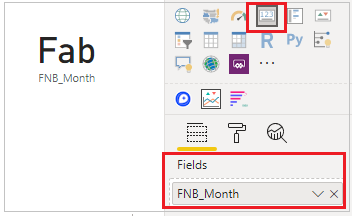
LASTDATE Function:
This function returns the last date in the current context for the specified column of dates. A table containing a single column and a single row with a date value will be returned.
LASTDATE(<dates>)When the current context is a single date, the date returned by the FIRSTDATE and LASTDATE functions will be equal.
Technically, the return value is a table that contains a single column and single value.
Therefore, this function can be used as an argument to any function that requires a table in its arguments. Also, the returned value can be used whenever a date value is required.
This DAX function is not supported for use in DirectQuery mode.
LastDate = LASTDATE('Calendar'[Calendar Date].[Date])LASTNONBLANK Function:
The LASTNONBLANK DAX function is used to returns the last value in the column for which the expression has a non blank value. This function comes under Time Intelligence DAX functions category.
LASTNONBLANK(<column>,<expression>)LNB Date wise = LASTNONBLANK(Sales[Date], [Total Sales])LNB Month Wise = LASTNONBLANK(Sales[Month], [Total Sales])
Hope you found the post informative. Your valuable feedback, question, or comments about this post are always welcome by leaving me message on contact form is truly appreciated.
Discover more from LR Virtual Classroom
Subscribe to get the latest posts sent to your email.
 LR Virtual Classroom