
The filtering functions let you manipulate data context to create dynamic calculations. Today, lets learn about the new filter functions named AllSelected() and AllNoblankrow().
The filter functions in DAX are some of the most complex and powerful, also differ greatly from Excel functions. Check out the post for most commonly used functions All() & AllExcept().
Note that most of the Filter functions are not supported for use in DirectQuery mode when used in calculated columns or rowlevel
security (RLS) rules.
D-Code DAX – AllSelected():
ALLSELECTED function gets the context that represents all rows and columns in the query, while keeping explicit filters and contexts other than row and column filters. This function can be used to obtain visual totals in queries.
ALLSELECTED ([<tableName> | <columnName>])
The name of a table and the column, and no expression here.
ALLSELECTED function takes one arguments either Table or column name.
The biggest difference between ALL() and ALLSELECTED is that the ALL() function ignores all filters, regardless of where they are coming from.
In contrast, the ALLSELECTED() function only ignores filters that are coming from the inner query.
In the below example, check how the values are changing based on the filters.
Total Fin Sales = SUM(financials[ Sales])Sales All() = CALCULATE([Total Fin Sales],all(financials))Sales Allexcept() = CALCULATE([Total Fin Sales],ALLEXCEPT(financials,financials[Country]))Sales Allselected() = CALCULATE([Total Fin Sales],ALLSELECTED(financials[Country]))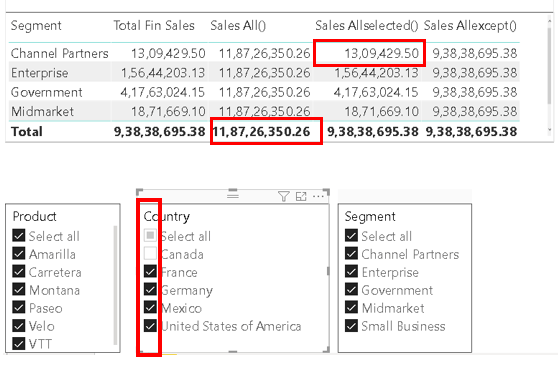
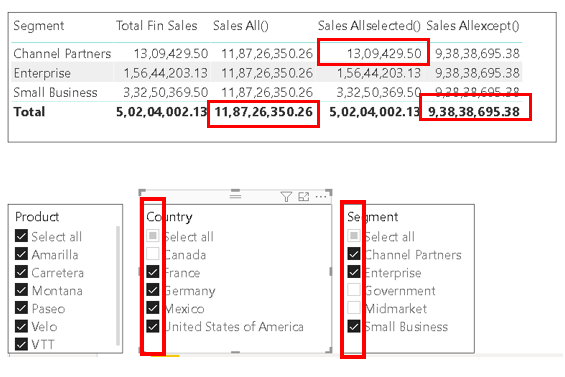
Shown below, after removing the filters from Segment and Country, compare the values from All(), AllSelected() & Allexcept().
D-Code DAX – AllNoblankRow():
From the parent table of a relationship, returns all rows but the blank row, or all distinct values of a column but
the blank row, and disregards any context filters that might exist.
ALLNOBLANKROW( {<table> | <column>[, <column>[, <column>[,…]]]} )
The table or column name over which all context filters are removed. Only one parameter must be passed; the parameter is either a table or a column
ALLNOBLANKROW function does not consider the blank rows in a table, but only considers the blank row that is a special case generated in a parent table, when one or more of the child tables in the relationship contain non-matching values or blank values.
In simple words, ALLNOBLANKROW performs the same function as All(), but it does not return the blank row generated by DAX when invalid relationship is detected.
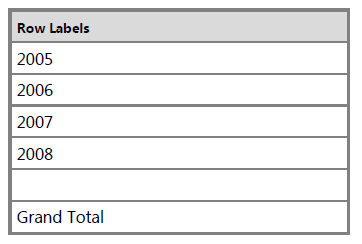
COUNTROWS (ALLNOBLANKROW (Month)) - Returns 5 =COUNTROWS (ALL (Month)) - Returns 6 Hope you found the post informative. Your valuable feedback, question, or comments about this post are always welcome by leaving me message on contact form is truly appreciated.
Discover more from LR Virtual Classroom
Subscribe to get the latest posts sent to your email.
 LR Virtual Classroom