All and Allexcept are useful filter related DAX functions which will help in data analysis many ways. The ALL () Function returns all the rows in a table, or all the values in a column, ignoring any filters that might have been applied whereas ALLEXCEPT() ignores all the filters applied except the one called under parameters. Lets see in detail with examples.
Use of “All” DAX function with SUMX:
Using All() function along with Sumx has more advantage as it’s name suggests, returns all the rows in a table, or all the values in a column, clearing all the filters. Say if you want to find the Total sales & Total cost to calculate the % of sales & cost in each Brand, lets write the code as below.
The main advantage is if I have used slicer in the visualization, the Total sales will still show sum of all the sales.
ALL( [<table> | <column>[, <column>[, <column>[,…]]]] )
The table that you want to clear filters on.
The column that you want to clear filters on.
Examples:
In the below picture, we have given All() which ignores all the filter in the dataset.
Sales All() = CALCULATE([Total Fin Sales],All())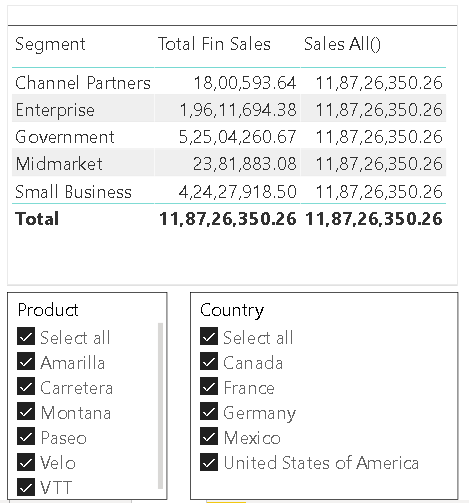
The below shows that the Sales All() is not changed for any filters applied.
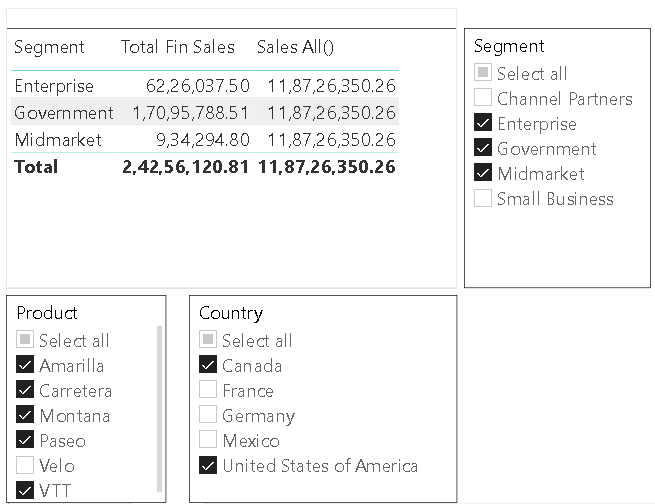
Few Scenarios of using All() function:
Total Sales = SUMX(ALL(Sale), [Sum of Sales]) - Here I have selected table name " Sale" which means it ignores all the filters from the table. Total Sales = CALCULATE(Sale[Sum of Sales],ALL()) - Here I have given blank parameter All() which means ignores all the filters in the dataset. Total Sales = CALCULATE(Sale[Sum of Sales],ALL(Sale[Month No])) - Here I have selected column Month No which means values of sales will change for all applied filters except Month No. Now, I can calculate the % of sales & cost in each Brand.
% of Sales = DIVIDE([Sum of Sales],[Total Sales])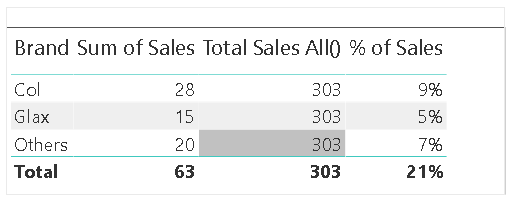
Compare the two tables below, the total sales is 303 whereas in the second table, even when I applied slicer, the value remains the same. Because, it is basically INCLUDING ALL the filter when calculating the Total sales field irrespective of what is been selected.
Use of “AllExcept” DAX function with SUMX:
Removes all context filters in the table except filters that have been applied to the specified columns. If you want certain filters to be applied and ignore all other filters, then call out the column name as one of the parameters of ALLEXEPT() function.
ALLEXCEPT(<table>,<column>[,<column>[,…]]) - Removes all context filters in the table, except filters that are applied to
the specified columns
The table name over which all context filters are removed, except filters on those columns that are specified in subsequent arguments.
The column name for which context filters must be preserved.
The below code shows the “Sales Allexcept” value only for Country. Compare the picture below, the change in the sum of sales values based selection.
Hence it is basically AVOIDING ALL the filters except Country.
Sales Allexcept() = CALCULATE([Total Fin Sales],ALLEXCEPT(financials,financials[Country]))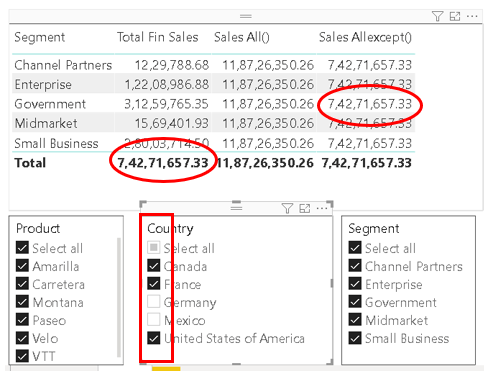
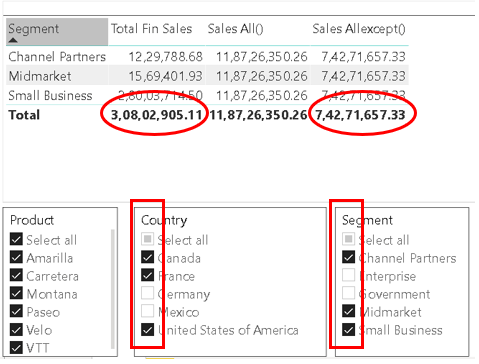
Hope you found the post informative. Your valuable feedback, question, or comments about this post are always welcome by leaving me message on contact form is truly appreciated.
Discover more from LR Virtual Classroom
Subscribe to get the latest posts sent to your email.
 LR Virtual Classroom