In this post, we are going to learn about the DATEADD, DATEDIFF, DATEBETWEEN, and DATESINPERIOD functions.
These functions are very useful when dealing with dates.
DATEADD Function (DAX)
Definition:
Returns a table that contains a column of dates that has been shifted or moved by no of intervals mentioned in the field.
The result is the new table with the SINGLE COLUMN of dates calculated based on the expression.
1. To add or subtract a specified time interval from a date
2. To Add two months to a date, then return the date
3. Add 18 years to the date in the BirthDate column, then return the date
Syntax & Example:
DATEADD(<dates>,<number_of_intervals>,<interval>)
wheras the interval can be year, quarter, month and day.
Dateadd Month = DATEADD('Calendar'[Date],1,MONTH)Dateadd Quarter = DATEADD('Calendar'[Date],1,QUARTER)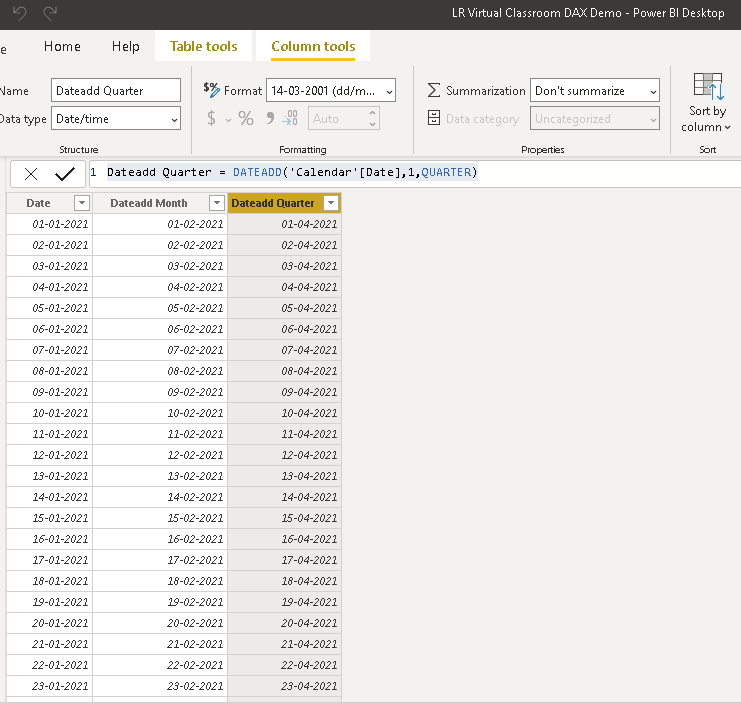
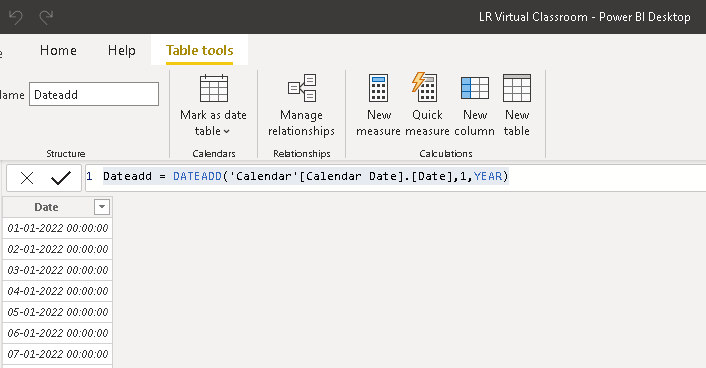
Another example, If you have a date field in the data set starting from 1/1/2021 and you want to create a new table starting with dates from 1/1/2022, you can use the below syntax.
Dateadd = DATEADD('Calendar'[Calendar Date].[Date],1,YEAR)
whereas Calndar Date has the dates starting from 1/1/2021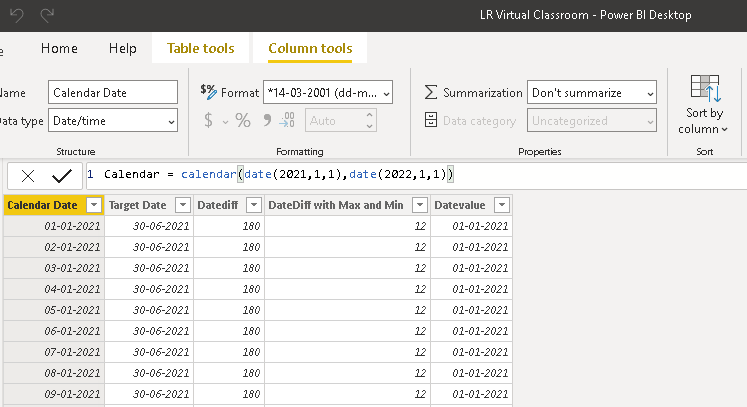
DATEDIFF Function (DAX)
Definition:
Unlike DATEADD, DATEDIFF() does not return the table. It returns a column with the count of interval boundaries crossed between two dates.
I can use date() function to manually call out the dates or MAX() & MIN() function to call the reference dates.
Syntax & Example:
=DATEDIFF(Date1, Date 2, <interval>)
=DATEDIFF(date(2021,1,1),date(2021,6,30),DAY) - returns the no. of days between two given dates.
The interval field denotes any of the below and it is a mandatory field.
- SECOND
- MINUTE
- HOUR
- DAY
- WEEK
- MONTH
- QUARTER
- YEAR
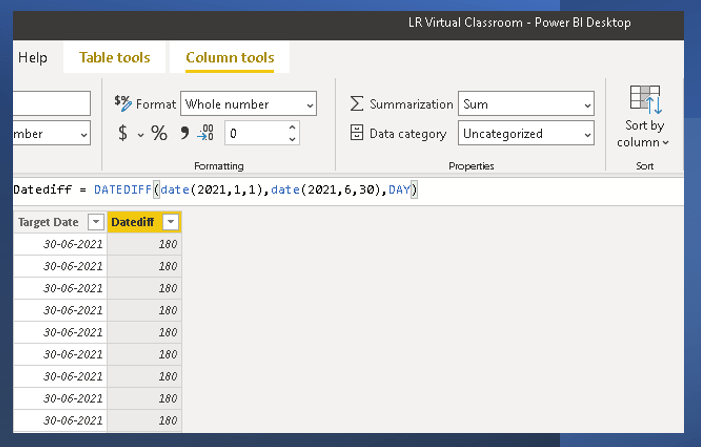
=DATEDIFF(MIN( 'Calendar'[Calendar Date] ), MAX('Calendar'[Calendar Date]),MONTH)
The above code takes the Max and Min date from the calendar table in the existing table and calculates the diff.

DATESBETWEEN Function (DAX)
DEFINITION:
DATESBETWEEN() returns a table that contains a column of dates that begins with the start_date and continues until the end_date.
The result is the new table with the SINGLE COLUMN of dates calculated based on the expression.
With this function, you do not need to worry about the interval or number of intervals. This DAX function is not supported for use in DirectQuery mode
DatesBetween is a period of dates inclusive of both start and end date.
An important understanding of this function is that the function itself doesn’t go back or forth from the start date to give you the period. You have to calculate the start or the end date first, and then get the period based on that.
For example, you can use DATEADD, DATE function to calculate the start or end dates and also manually call the dates as well.
Syntax
DATESBETWEEN(<dates>,<start_date>,<end_date>)

If the start and end date are left blank, then date will the earliest value in the dates column.
This function can be used along with calculate() function. Let’s see some examples.
Example 1:
I have calculated the units sold only in 2013 using calculate and datesbetween function.
Units Sold in 2013 only = CALCULATE(SUM(financials[Units Sold]),DATESBETWEEN(financials[Date],DATE(2013,09,1),DATE(2013,12,1)))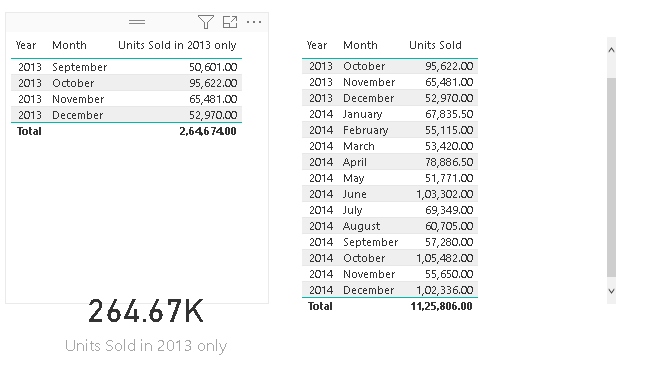
Example 2:
I have calculated the units sold only for the last 6 months. For this, I’m going to use the DATEADD() function to calculate the start date and End date will be lastdate() function based on the dateset.
This will allow me to calculate the rolling units sold for last 6 months for every refresh of the data.
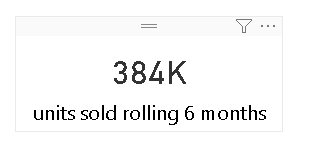
units sold rolling 6 months = CALCULATE(SUM('financials updated'[Units Sold]),DATESBETWEEN('financials updated'[Date],DATEADD(LASTDATE('financials updated'[Date]),-5,MONTH),LASTDATE('financials updated'[Date])))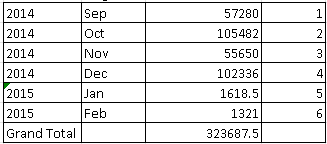
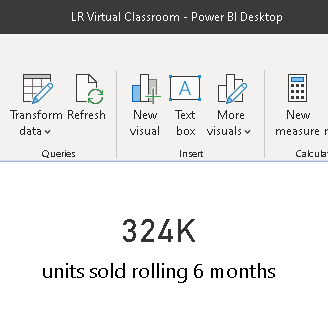
Have you noticed the interval as “-5” instead of “-6”? It is because the DatesBetween is a period of dates inclusive of both start and end date. If i have given “-6”, it gives the sum for the last 7 months.
units sold rolling 6 months = CALCULATE(SUM('financials updated'[Units Sold]),DATESBETWEEN('financials updated'[Date],DATEADD(LASTDATE('financials updated'[Date]),-6,MONTH),LASTDATE('financials updated'[Date])))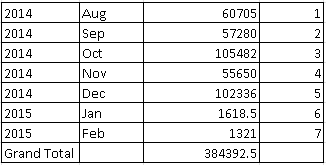
DATESINPERIOD FUNCTION (DAX):
DEFINITION:
This DATESINPERIOD function also returns a table that contains a column of dates that begins with the start_date and continues for the specified number_of_intervals.
The main difference between DATESBETWEEN and DATESINPERIOD is that
DatesBetween is a period of dates inclusive of both start and end date. DatesInPeriod is giving you the period of dates and excluding unwanted dates.
Sometimes, you have the start and end date, and you want to get all dates in that period, DatesBetween is definitely a good function to use in this situation.
Sometimes, you do not have both ends of the period, you just have one, and the interval, in that case, DatesInPeriod is your best friend.
Syntax & Example:
DATESINPERIOD(<dates>,<start_date>,<number_of_intervals>,<interval>)Let’s see how to write the DAX code.
Units sold datesinperiod = CALCULATE(SUM('financials updated'[Units Sold]),DATESINPERIOD('financials updated'[Date],LASTDATE('financials updated'[Date]),-6,MONTH))Units Sold datesbetween = CALCULATE(SUM('financials updated'[Units Sold]),DATESBETWEEN('financials updated'[Date],DATEADD(LASTDATE('financials updated'[Date]),-5,MONTH),LASTDATE('financials updated'[Date])))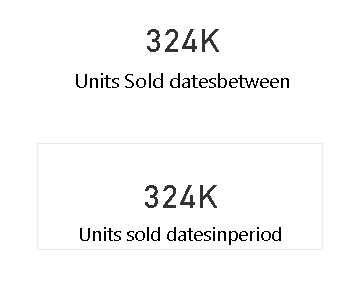
Hope you found this post useful. If you found the post informative, your valuable feedback, question, or comments about this post are always welcome by leaving me message on contact form is truly appreciated.
Discover more from LR Virtual Classroom
Subscribe to get the latest posts sent to your email.
 LR Virtual Classroom