Date and Time Functions (DAX): Just like in MS Excel, there are a lot of similar DAX functions to work with Date and Time-related data in Power BI. They are very useful in many scenarios when dealing with data analysis or while representing dashboards using weeknum, quarter, or yearly data. Let’s explore the basic ones with examples.
CALENDAR Function (DAX)
Definition:
This function returns the calendar table with a single column name “Date” containing a contiguous set of dates. The range of dates is from the specified start date to the specified end date, inclusive of those two dates. An error is returned if start_date is greater than end_date.
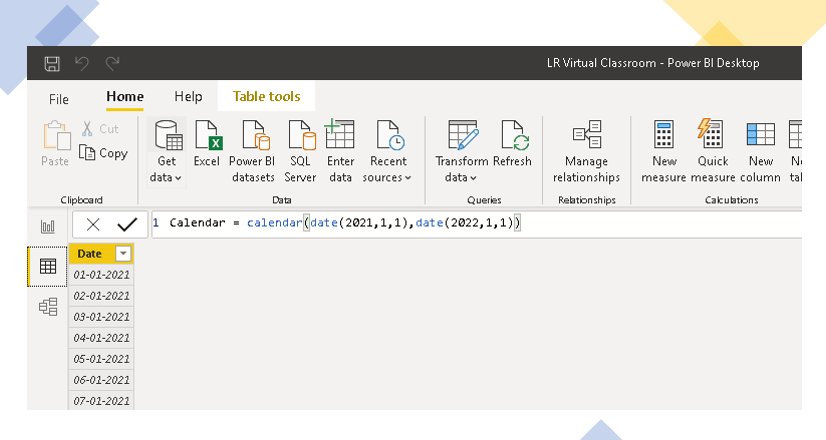
To create a calendar table, Modelling tab – > Insert Table -> Change the name of the table -> Write the code below.
Syntax:
=CALENDAR(<start_date>, <end_date>)=CALENDAR (DATE (2021, 1, 1), DATE (2022, 12, 31))=CALENDAR (Minx(sales, [date],Maxx(Forcast, [date])) - returns the calendar table based on the earliest & latest date in the sales & forecast table in your data model. Example:
CALENDARAUTO Function (DAX)
Definition:
Returns a table with a single column names “Date” that contains a contiguous set of dates. The range of dates is calculated automatically based on data in the model.
The date range is calculated as follows:
✅ The earliest date in the model, which is not in a calculated column or calculated table, is taken as the MinDate.
✅ The latest date in the model, which is not in a calculated column or calculated table, is taken as the MaxDate.
Syntax:
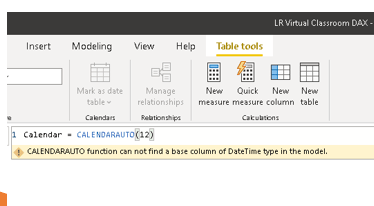
CALENDARAUTO([fiscal_year_end_month])CALENDARAUTO() - returns the calendar table based on the min & max date in the existing data model. An error is returned if the model does not contain any datetime values, which are not calculated columns or calculated tables. Refer the screenshot below ( Calendarauto DAX function with no data model)
The date range returned is dated between the beginning of the fiscal year associated with MinDate and the end of the fiscal year associated with MaxDate.
Example:
CALENDARAUTO(12) - returns 12 months from the min date from the data model. Say, if the min date in the data model is 1st Jan 2007, then a calendar table is created from 1st Jan 2007 to 31st Dec 2007.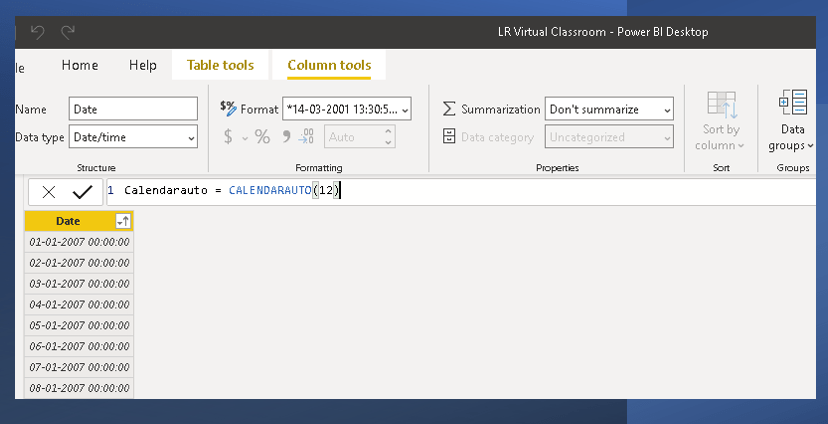
DATE Function (DAX)
Defintion:
Returns the specified date in datetime format. In below example, I have added new column saying Target Date as 30th June 2021 against which I can perform any calculation analysis.
Syntax:
=DATE(<year>,<month>,<day>)Example:
=DATE(2021,6,30) - returns the target date as 30th June 2021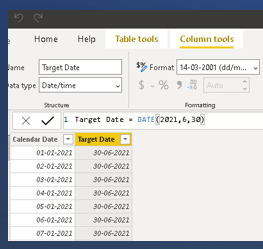
DATEDIFF Function (DAX)
Definition:
Returns the count of interval boundaries crossed between two sides.
Syntax & Example:
=DATEDIFF(Date1, Date 2, <interval>)=DATEDIFF(date(2021,1,1),date(2021,6,30),DAY) - returns the no. of days between two given dates.The interval denotes any of the below and it is mandatory field.
- SECOND
- MINUTE
- HOUR
- DAY
- WEEK
- MONTH
- QUARTER
- YEAR
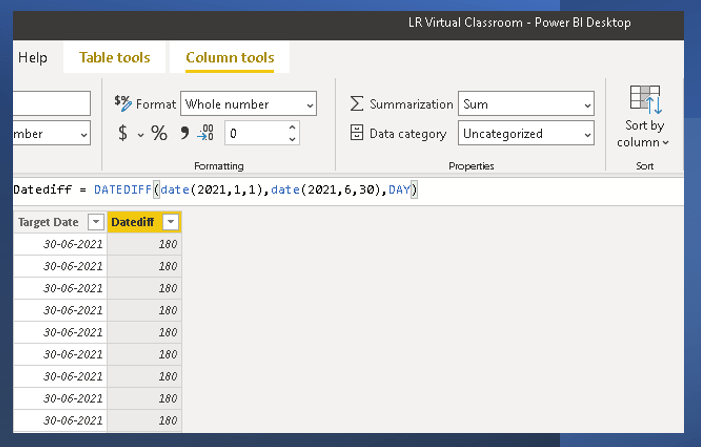
=DATEDIFF(MIN( 'Calendar'[Calendar Date] ), MAX('Calendar'[Calendar Date]),MONTH)The above code takes the Max and Min date from the calendar table in the existing table and calculates the diff.

DATEVALUE Function (DAX):
Definition:
Converts a date in the form of text to a date in datetime format. It is important to note that the date text should be enclosed in the double quotes.
Syntax:
DATEVALUE("date_text")Example:
=DATEVALUE("8/1/2021") - returns date as 1st Aug 2021.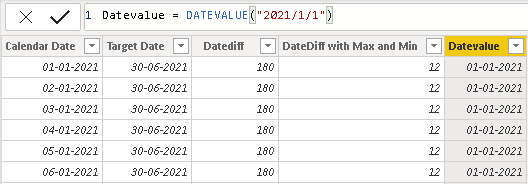
DAY Function (DAX):
Definition:
There are 3 scenarios you can use Day function as below:
- Getting the day from a date column
- Getting the day from a string date
- Using a day value as a condition
Syntax & Example:
- Getting the day from a date Column or a string date:
=DAY('Calendar'[Date]) - returns the day of the given date.
=DAY("3-4-1007")
=DAY("March 4 2007")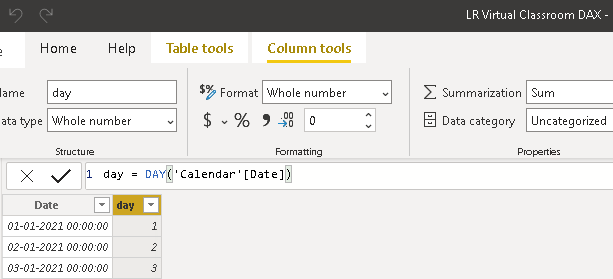
2. Using a day value as a condition:
We can use the day function combined with the If function as below. The code below returns Promotion if the day is an odd number or Holiday if the day is an even number.
Promotional day or Holiday = IF( ISODD('Calendar'[day]),"PROMOTION","HOLIDAY")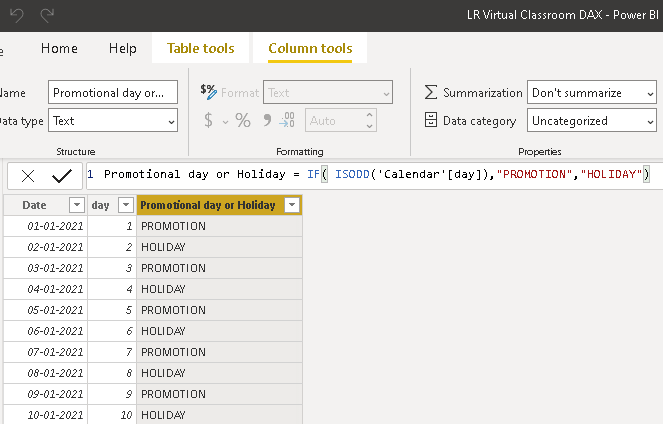
WEEKDAY Function (DAX):
Definition & Syntax:
Returns a number from 1 to 7 identifying the day of the week of a date. By default, the day ranges from 1 (Sunday) to 7 (Saturday).
WEEKDAY(<date>, <return_type>)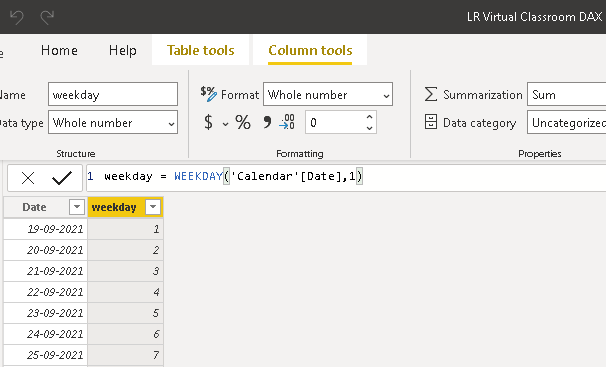
WEEKNUM Function (DAX):
Definition:
Returns the week number for the given date according to the return_type value. The week number indicates where the week falls numerically within a year.
By default, the WEEKNUM function uses a calendar convention in which the week containing January 1 is considered to be the first week of the year.
Syntax & EXample:
=WEEKNUM(<date>[, <return_type>])=WEEKNUM("Feb 14, 2010", 2) assumes week begins on Monday.
=WEEKNUM('Employees'[HireDate]) assumes week begins on Sunday which is default.YEARFRAC Function (DAX):
Definition:
Calculates the fraction of the year represented by the number of whole days between two dates.
Syntax & Example:
YEARFRAC(<start_date>, <end_date>, <basis>)Basis – Description
0 – US (NASD) 30/360
1 – Actual/actual
2 – Actual/360
3 – Actual/365
4 – European 30/360
=YEARFRAC(Orders[TransactionDate],Orders[ShippingDate]) - returns the fraction of a year represented by the difference between the dates in the two.Some Common & Simple DATE Function (DAX):
Let’s see some of the simple Date functions which can be used for various analysis.
| DAX Syntax | Syntax/Format | Function |
|---|---|---|
| EDATE | EDATE(givendate,3) returns the date after 3 months of the given date. | Returns the date that is the indicated number of months before or after the start date. |
| EOMONTH | EOMONTH(“March 3, 2021”,1.5) returns the 31st May 2021 | Returns the date in datetime format of the last day of the month, before or after a specified number of months. Use EOMONTH to calculate maturity dates or due dates that fall on the last day of the month. |
| Month(date) | MONTH(“March 3, 2021 3:45 PM”) returns “3” | Returns the month as a number from 1 (January) to 12 (December). |
| QUARTER(date) | EVALUATE { QUARTER(DATE(2021, 2, 1)), QUARTER(DATE(2021, 12, 31)) } – returns 1 and 4 respectively | Returns the quarter as a number from 1 to 4. |
| Year(date) | YEAR(“March 2021”) returns “2021” | Returns the year of a date as a four-digit integer in the range 1900-9999. |
| Hour(time) | HOUR(“March 3, 2021 3:00 PM”) returns “15” | Returns the hour as a number from 0 (12:00 A.M.) to 23 (11:00 P.M.). |
| Second(time) | SECOND(“March 3, 2021 12:00:03”) returns “3” | Returns the seconds of a time value, as a number from 0 to 59 |
| Now() | NOW()+3.5 – returns the current date and time plus 3.5 days | Returns the current date and time in datetime format. |
| Today() | YEAR(TODAY())-1963 – returns the person’s age. | Returns the current date. |
Check out the future post for more advanced Date & Time DAX functions.
Hope you found the post informative. Your valuable feedback, question, or comments about this post are always welcome by leaving me message on contact form is truly appreciated.
Discover more from LR Virtual Classroom
Subscribe to get the latest posts sent to your email.
 LR Virtual Classroom