
👤 Authored by Lashmi Bai Ravindrapandian
📅 Published on Apr 5, 2025
I send a lot of different types of communication as part of my work. Emails, Teams messages, stakeholder updates, project communications, reminders, escalations, change-management messages.
And I’ve realised something. Writing the message is only half the job. The other half is asking…… “how will the other person actually read this?”
Sometimes I know exactly what I mean when I write something. But the person receiving it doesn’t have the same context I have. A sentence that sounds perfectly normal to me can sound harsh to someone else. A simple reminder can sound like an escalation. A change announcement can create anxiety even when that wasn’t the intention. And sometimes, we simply assume people know things that they don’t.
That’s why I started using AI as a communication reviewer, rather than asking it to write everything for me.
I Don’t Ask AI to Rewrite First
This is important to me. I don’t want AI to immediately take my message and turn it into some perfectly polished corporate email.
First, I want it to challenge what I have written.
- What is clear?
- What could be misunderstood?
- What is missing?
- How might different people react?
Only after I understand those things do I decide whether I want to change the message.
So I created a common prompt that I can use before sending almost any professional communication.
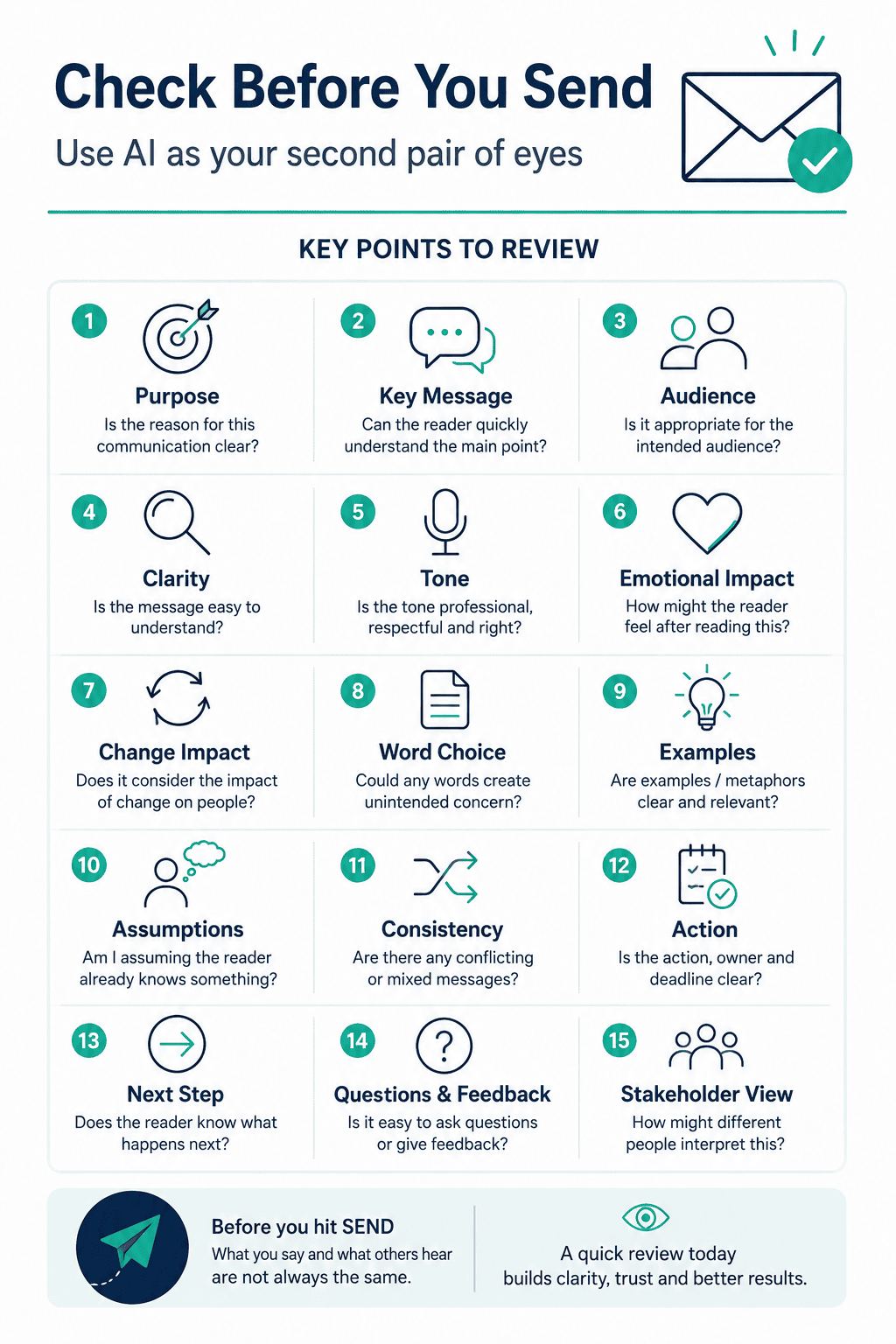
What I Ask AI to Check
I don’t want the AI to apply the entire checklist blindly. A simple meeting reminder doesn’t need the same level of change-management analysis as an announcement about a major organisational change. So the instruction is, use only the checks that are actually relevant.
Here are the areas I want AI to look at:
- Purpose: is it obvious why I’m sending this? Sometimes we write a long message and the reader still has to figure out what we actually want.
- Key Message: can the reader understand the main point quickly? If they read only the first few lines, do they know what this is about?
- Audience: am I communicating appropriately for the person receiving it? The same message may need a different tone for senior leadership, a project team, a customer, or a colleague.
- Clarity: I ask AI to look for vague wording, confusing sentences, unnecessary jargon, unexplained acronyms, ambiguous instructions. Basically, could someone reasonably read this and understand something different from what I intended?
- Tone: this one matters a lot. Is the message respectful? Too formal? Too casual? Too strong? Too defensive? Sometimes I don’t notice the tone because I wrote the message myself. Having another perspective helps.
- Emotional Impact: one of my favourite checks, especially when the communication is related to change. Could this message create anxiety, fear, frustration, resistance, defensiveness, mistrust? We may not intend any of these, but communication isn’t only about what we say, it’s also about what people hear.
- Change Management Check: if the message is about change, I want AI to look at it differently, why are we changing, what’s changing, why does it matter, what remains the same, what do people need to do, what support is available, can they ask questions. And one question I particularly like, are we communicating this too soon? Sometimes we’re ready for the change because we’ve been discussing it for months. The people receiving the message may be hearing about it for the first time. That’s a big difference.
- Check the Words: certain business words can create reactions even when we don’t intend them to, restructuring, rationalization, efficiency, compliance, performance, escalation. Not saying these words are wrong, the point is to ask, what might someone interpret when they read this word in this particular context?
- Check Metaphors and Examples: I sometimes like using simple examples or metaphors to explain change, but not every metaphor works for every audience. So I ask AI to check, is this easy to understand, could it sound negative or intimidating, does it actually help explain the message, or am I just making the communication more complicated?
- Look for Assumptions: when we’re close to a project, we know all the background. The reader may know none of it. So I ask, what am I assuming the reader already knows? Sometimes one missing sentence of context can completely change how the message is understood.
- Look for Conflicting Messages: I also ask AI to check for contradictions. For example, we say something is optional in one paragraph and then ask everyone to complete it by Friday. Or we say feedback is welcome but don’t explain where people can provide it. These small inconsistencies can create unnecessary confusion.
- Check the Action: if I want someone to do something, I want the message to make that obvious, what do they need to do, who needs to do it, by when, what is expected after that. A communication can be beautifully written and still fail if the reader doesn’t know what to do next.
- Think Like the Reader: probably the biggest reason I use this prompt. I ask AI, if someone reads this quickly without speaking to me, what could they misunderstand? That question alone can uncover things I didn’t notice while writing. Because I know what I meant. The reader doesn’t.
- Hearts and Minds: for change-related communication, I also ask AI to check two sides. The mind, is the logic clear, is the reason clear, is the action clear, is there enough context. The heart, will people feel respected, could they feel threatened, could they feel ignored, have we considered the human impact. We need both.
I Don’t Want AI to “Fix” Everything
This is another rule I added. I don’t want AI to automatically rewrite every message.
- If something is already good, tell me it’s good
- If there is a problem, explain the problem
- If there is missing information, tell me what’s missing
- If you have a suggestion, clearly identify it as a suggestion
- And don’t create facts, dates, commitments, decisions or reasons that I didn’t provide
Only after seeing the review do I decide whether I want AI to rewrite the communication.
Do message me if you want my AI Communication Review Assistant – System Prompt.
Happy to share them.
Discover more from LR Virtual Classroom
Subscribe to get the latest posts sent to your email.