
JQL (Jira Query Language) is very simple and interesting to learn, unlike SQL. Just like Excel, you need more practice and remember the concepts to apply the JQL. It is important to know the powerful way of writing the JQL to get the results that you need at the click of a button. So listing down all the JQL-related learnings.
This is a good reference post when one get struck while writing the queries and will help to be more productive at work.

Other post on Jira, you can find here. Jira in Layman Terms , Jira Reporting for Beginners, Optimize Jira with these Tips
Components of Jira Query:
When you start writing a query, you need to understand the below four important components.
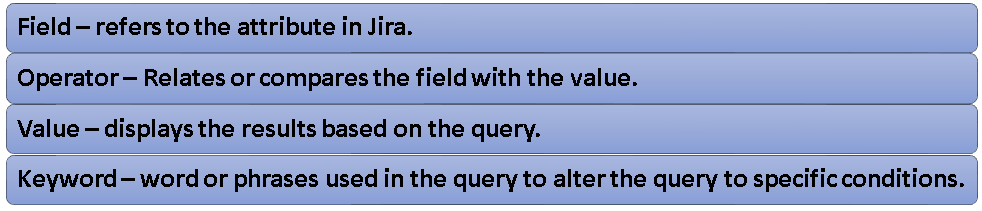
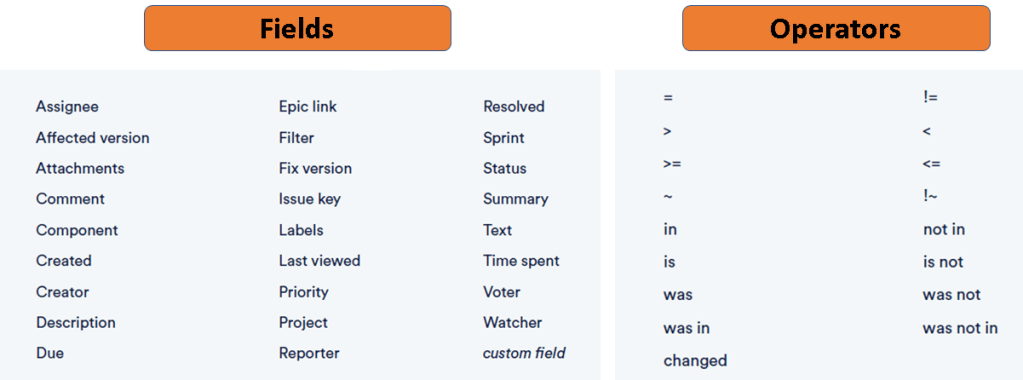
Lets see the list of commonly used fields and operators in Jira.
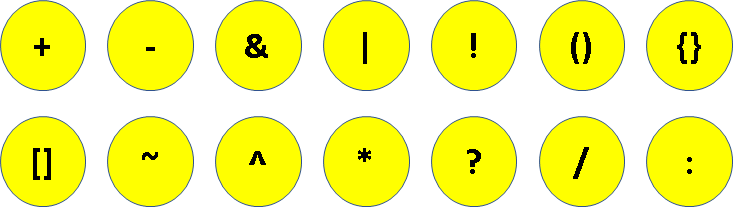
Wildcard Characters:
The below wildcard characters are used in JQL for various purposes. It’s very significant to know the usage of these characters. They will help you to narrow or widen your search and also in case of uncertainties.
Few examples of the query:
Simple search using Field / Operator / Value
Display all the issues in the specific project
project = "software enhancement"
Display all the issues assigned to "Lashmi" in the specific project
project = "software enhancement" AND assignee = "lashmi"Display all the issues assigned to "Lashmi" which is "In progress" status in the specific project
project = "software enhancement" AND status = "In Progress" AND Assignee in (lashmi)Search using Date fields:
Use POSITIVE number of (days, weeks) if you are looking for issues in the FUTURE. It is between Now and Later.
Displays issues due within next 3 days
due <=3d
Displays issues due within next 7 to 10 days
due >=7d AND due <=10d
Displays issues due in the next 24 hrs
due >= 24h
Use NEGATIVE number of ( days, weeks) if you are looking for issues in the PAST. It is between the Now and Then.
Displays the issues updated in the last 2 weeks
updated >=-3w AND updated <=-1w
Displays the issues created in the last 24 hrs
created >= -24h
Search for Exact phrase using “\”
Displays the issues with phrase "teams in space"
text ~ "\" teams in space \ ""
Displays the issues with phrase "teams in space" & assigned to Lashmi
text ~ "\" teams in space \ "" AND assignee in (lashmi)Few scenarios using Wildcard Characters
Character Usage: ~
Displays any issues with the text "encoding" in specific project
project = "software enhancement" AND text ~ "encoding"
Displays any issues with the text either 500 or 404 in comment
comment ~"500 OR comment ~ "404Displays any issues with the text both 500 & error ( in any order)
comment ~ "500 AND error"Character Usage : *
Displays any issues with the text that begins with network and ends with error
project = "software enhancement" AND text ~ network*error
Results will be  - network20error , network200error
Displays any issues with the text that begins with network*
project = "software enhancement" AND text ~ network*
Results will be - network30 , networkconnectionCharacter Usage : ?
To replace a single character
project = "software enhancement" AND text ~ network2?error
Results will be - network20error , network200error
Functions in JQL
Lets see some of the most commonly used functions in Jira. They have the ability to simply your query and also provide advanced filtering option in your search.
Currentuser()
Displays the issues created by the current user (who ever runs the query) within last 24 hrs.
This can be shared with other users so that they can see their respective issues list. Supported fields are Assignee, Reporter, Voter, Watcher, Creator, custom fields of type User.
assignee = currentuser() and created >=-24h
Currentlogin()
Displays the issues created since I first logged in?
created < currentlogin()
Can be used with fields like - Created, Due, Resolved, Updated, custom fields of type Date/Time
lastlogin()
Displays the issues created since I last logged in!
created > lastlogin()
membersof()
Displays the issues created by the Dev team!
creator IN membersof("Dev-team")
watchedissues()
Displays the issues which I'm watching!
issues IN watchedissues()
issuehistory()
Displays the issues which I looked most recently ( history)
issues IN issuehistory()
now()
Displays the issues created in last 24 hrs.
created >= -24h AND created < now()
startofday() ; startofweek() ; startofmonth() ; startofyear() Measures from 12 AM
Displays the issues created in the start of the current week/day/year
Supported for fields - Created, Due, Resolved, Updated, custom fields of type Date/Time

created > startOfday() ( start of current day - Today)
created > startOfweek() ( start of week - Sunday)
created > startOfmonth() ( start of current month)
created > startOfyear() ( start of current year)

Displays the issues created in the start of the last week/day/year
created > startofday(-1) ( since the start of yesterday)
created > startofday(-2) ( since the last two days)
created > startofweek(-1) ( since the start of last week)
created > startofmonth(-1) ( since the start of last month)
created > startofyear(-1) ( since the start of last year)
endOfDay() ; endOfWeek() ; endOfMonth() ; endOfYear() Measures until before 12PM
Displays the issues created in the start of the current week/day/year.
Supported for fields - Created, Due, Resolved, Updated, custom fields of type Date/Time

DUE < endOfDay("+1") ( end of tomorrow)
DUE < endOfWeek("+1") ( end of next week)
DUE < endOfMonth("+1") ( end of next month)
DUE < endOfYear("+3M") ( due by the end of March next year)
opensprints() ; closedsprints()
Displays the issues currently in all the open sprints
sprint in opensprints()
Displays the issues currently in all the closed sprints
sprint in closedsprints()
Lets now see some of the use cases of JQL:
Use Case 1: Retrieve Approved Functional Integrations
project = CON0003774 AND issueFunction in linkedIssuesOf("issuetype in(Integration)", "parent of") AND status in (Completed) AND summary ~ Functional AND summary ~ approval AND labels in (Approve_FSD)
What it does:
- Finds issues in project
CON0003774that:- Are linked as parents of
Integrationissues - Have
Completedstatus - Contain both “Functional” and “approval” in the summary
- Are labeled with
Approve_FSD
- Are linked as parents of
Use Case: Show completed parent tasks of Integration items that have been functionally approved.
Use Case 2: Find Issues Assigned to “Client Visitor” Role
issueFunction in memberOfRole(assignee, "Client Visitor")
What it does:
- Lists issues where the assignee is part of the “Client Visitor” project role.
Use Case: Monitor work assigned to external stakeholders or clients.
Use Case 3: Functional Tickets Retested Today
status changed from Retest to Completed during (startOfDay(), endOfDay()) AND labels = Functional
What it does:
- Tracks issues labeled as Functional that moved from Retest → Completed today.
Use Case: Daily report of successfully retested functional issues.
Use Case 4: P3Tech Work Started Today (Non-Functional)
status changed from Validated to "In Progress" during (startOfDay(), endOfDay()) AND labels = P3Tech AND labels not in (Functional)
What it does:
- Shows P3Tech items (excluding Functional ones) that began work today.
Use Case: Track daily development starts in tech backlog.
Use Case 5: P3Tech Tickets Moved to Retest Today (Non-Functional)
status changed from "Code Review/Migration Request" to Retest during (startOfDay(), endOfDay()) AND labels = P3Tech AND labels not in (Functional)
What it does:
- Lists non-functional P3Tech items moved to Retest today from Code Review/Migration Request.
Use Case: QA workload planning.
Use Case 6: Test Executions Blocking FastFollow Defects
issuetype = "Test Execution" AND issueFunction in linkedIssuesOf("issuetype = 'Defect' AND labels = 'FastFollow'", "Blocks")
What it does:
- Shows test executions that are blocking FastFollow defects.
Use Case: Highlight critical testing blocking defect resolution.
Use Case 7: FastFollow Defects Blocked by Test Executions
issuetype = "Defect" AND issueFunction in linkedIssuesOf("issuetype = 'Test Execution' AND labels = 'FastFollow'", "Blocks")
What it does:
- Finds defects blocked by FastFollow-labeled Test Executions.
Use Case: Track defect dependencies on specific test sets.
Use Case 8: Defects Linked to FastFollow Test Executions (any link)
issuetype = "Defect" AND issueFunction in linkedIssuesOf("issuetype = 'Test Execution' AND labels = 'FastFollow'")
What it does:
- Shows defects linked in any way to FastFollow Test Executions.
Use Case: Broader overview of testing-defect relationships for FastFollow.
Use Case 9: Issues Linked to Recently Updated Stories
issueFunction in linkedIssuesOf("issuetype = 'Story' AND updated >= -7d")
What it does:
- Finds issues linked to stories updated in the last 7 days.
Use Case: Identify work affected by recent story changes.
Use Case 10: Issues Linked to Critical Improvements
issueFunction in linkedIssuesOf("issuetype = 'Improvement' AND labels = 'Critical'")
What it does:
- Lists issues related to critical improvement items.
Use Case: Assess impact of high-priority improvements.
Use Case 11: Issues Blocked by Tasks
issueFunction in linkedIssuesOf("issuetype = 'Task'", "is blocked by")
What it does:
- Finds issues that are blocked by tasks.
Use Case: Dependency tracking for task blockers.
Use Case 12: Issues Linked to a User’s Stories
issueFunction in linkedIssuesOf("issuetype = 'Story' AND assignee = 'username'")
What it does:
- Pulls issues connected to stories assigned to a specific user.
Use Case: Understand the downstream impact of a user’s backlog.
Use Case 13: UAT-Related Defects Logged After Jan 6
issuetype = Defect AND (fixVersion in (UAT, P4, "Focused UAT", P4_Testing) OR labels in (UAT, UAT_Defect, UAT_Integration)) AND created >= 2025-01-06 ORDER BY created ASC
What it does:
- Finds defects for UAT phases (by fixVersion or labels) created after Jan 6, 2025.
Use Case: UAT defect tracking in chronological order.
Use Case 14: Functional Tickets Validated Today
status changed from open to validated during (startOfDay(), endOfDay()) AND labels = Functional
What it does:
- Lists functional items that moved from Open to Validated today.
Use Case: QA progress snapshot.
Use Case 15: Functional Tickets Reopened Today
status changed from Validated to Reopened during (startOfDay(), endOfDay()) AND labels = Functional
What it does:
- Highlights functional issues that failed validation and were reopened today.
Use Case: Alert QA/dev teams about regressions.
Use Case 16: Functional Tickets Ready for Retest
status changed from "Code Review/Migration Request" to Retest during (startOfDay(), endOfDay()) AND labels = Functional
What it does:
- Shows functional issues that entered Retest today from Code Review.
Use Case: Plan QA resource allocation for upcoming retesting.
Use Case 17: Stories That Have Associated Tests
issuetype in (Story) AND issueFunction in hasLinkType(Tests)
What it does:
- Shows stories that have at least one issue linked with the “Tests” relationship.
Use Case: Validate test coverage for stories.
Use Case 18: Stories Missing Test Coverage
issuetype = Story AND issueFunction not in hasLinkType(Tests)
What it does:
- Lists stories without any linked test cases.
Use Case: Quality control for test planning.
Discover more from LR Virtual Classroom
Subscribe to get the latest posts sent to your email.
 LR Virtual Classroom