
I recently took a course on effective utilization of Jira. The reason behind is as the Jira tool is totally effective and productive ONLY if you and all the team members keep it updated. Sometimes updating the fields may be thought to be time-consuming BUT once you follow these Jira tips and strategies, you can turn it to your advantage and soon you find in completing your tasks more efficiently than before.
Let me share the learning from the course.
Tips for your Personal Use:
1. Make Jira part of their daily routine:
✅ Jira helps you keep organized: Updating Jira daily means you have a single location to view your current and upcoming work. You can see which issues are top priorities to get done first.
✅ Jira help you to track your tasks: Keeping your Jira issues up-to-date means you have data on your work performance and list of tasks achieved.
✅ Jira keep you in the loop on your team’s work: Team transparency is a critical factor for project success. Using Jira every day means you and your teammates know what’s happening across your projects. It’s a great way to stay connected and solve the issues at the moment.
2. Keep Jira Tab / Browser open, color coded:
No need to log in and out. Stay logged in and keep the tab open in your browser.
Create a color-coded tab for Jira Boards. If you have many tabs open, the color code and label help you find your Jira boards quickly. Another option is to keep browser window open dedicated only to your Jira projects.
3. Start your workday with Jira:
While you check your outlook mails and calendar as you begin your workday, ensure you add Jira to the list as well. In less than 5 min, you can see all your tasks to help prioritize your day.
4. Commit to a 15 min Jira Update daily:
Keep yourself accountable by adding events to your calendar. For example, try setting 15-min calendar events that repeat daily to remind you to “Check Jira and update issues.”
5. Effective use of tracking fields in Jira:
Try using Jira to document all team-related questions and activities. @mention in the comment will ensure the team gets the overall picture of the issue.
6. Watch your issues:
Automatically become a watcher of any issue that you are working on. It can be either that you create or comment/work on. This means you’ll get an email when someone updates or comments on the issue which enables you to stay updated all the time.
7.Email notification preferences in Jira:
If you feel you’re receiving too many emails from Jira, set up a filter in your outlook. You can have them labeled, categorized, and not cluttering your inbox. This will be better way to manage Jira emails instead of changing their email preference settings.
8. Filter to see only your issues:
This feature helps you cut through the clutter of issues and focus on your work only. To do this, Select your profile icon above the board (or) Select the ‘Only My Issues’ button.
9. Save important searches as filters:
Jira’s basic search feature allows you to save filters for future use. Based on the search criteria, Jira searches and filters the issues in a single place. A saved filter can be shared with teammates, pulled as a report, or displayed in a dashboard.
10. Use Custom dashboards to see everything all at once:
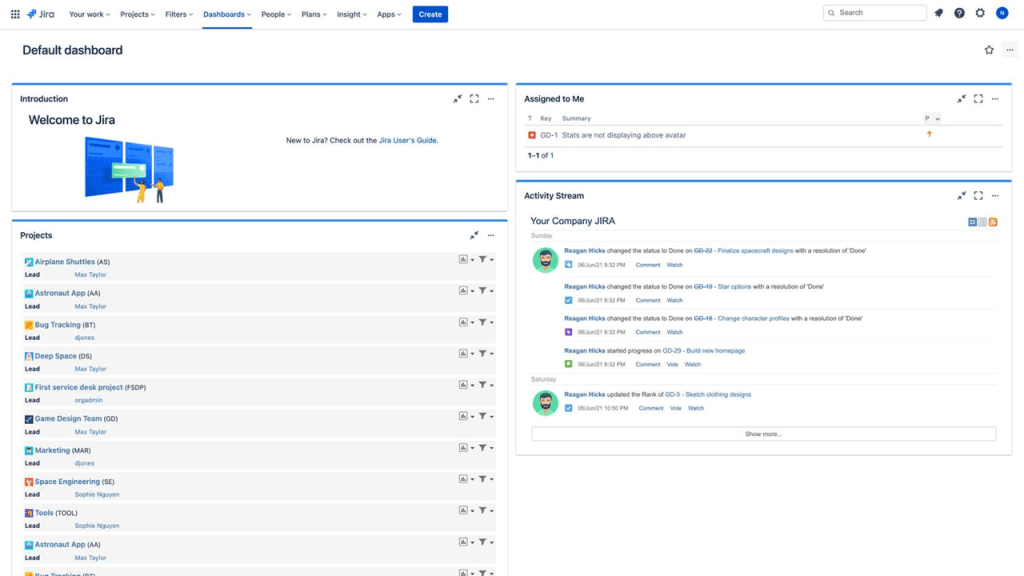
A dashboard is a customized screen to give you a high-level snapshot of everything happening in Jira. Dashboards are made up of small configurable blocks called gadgets.
- 📗Your default dashboard may have gadgets like Introduction, Projects, Assigned to Me, and Activity Stream.
- 📗The overall dashboard layout is entirely customizable.
- 📗 You can create multiple dashboards for different projects.
Tips for your Project Team Use:
Lets see some of the strategies you can implement in your project.
1. Short and clear summaries:
The summary is the title of an issue. Summaries are required for every new issue you create. The best practice is to keep each summary between 5-7 words. Write them in crisp and precise language so anyone on your team can understand at a glance. Here are a few suggested writing formats to try:
🟡 Tasks – Write task summaries like this: “<ACTION> <ACTIVITY/THING>.” (e.g., “Build new homepage”)
🟡 Stories – Write story summaries like this: “As a <PERSONA>, I want <THING>.” (e.g., “As a user, I want a back button”)
🟡 Bugs – Write bug summaries like this: “<FEATURE> should do <X>, but does <Y>.” (e.g., “Menu button should show menus, but errors out”)
2. Create multiple issues at a time with the roadmap or backlog:
When planning new initiatives from start to finish, you can create a sequence of new issues from a single view.
➡️ To create multiple issues from the roadmap, select the button ‘Create issue.’ Type in a summary. Save your changes by selecting ‘Review changes’ at the top right of your screen.
➡️ To create multiple issues from the backlog, scroll to the bottom of the backlog and select ‘Create issue.’ Type in a summary.
3. Flag important issues:
It’s a great way to bring awareness to any issue that requires escalation. You may need to flag an issue that is in danger of missing its delivery date. Or flag an issue that’s blocked by another task or problem.
🚩To add a flag to an issue: Open an issue Select the ellipses ••• and select Add flag
4. Use comments for every communication:
Comments should be your go-to feature in Jira. Use comments to document any update, question, or request or even to get clarified. This way, your team will see the entire history of an issue’s progress throughout the workflow. This can help you more accurately plan your future work.
💥 If there’s one best practice which is must to be followed, then use the Jira comments. For every communication!
5. Integrate Jira with other tools:
Integrating Jira to the below tools will help in real-time insight about your Jira projects:
- 🎯Confluence
- 🎯 Microsoft Teams
- 🎯 Slack
- 🎯 Zoom
Hope you find all these tips and tricks helpful. Sharing is caring.
Discover more from LR Virtual Classroom
Subscribe to get the latest posts sent to your email.
 LR Virtual Classroom