
Having a hands-on experience in Jira is one of the most sought skill these days in IT world. Thanks to the tremendous success of Agile Project Management Methodology.
In this post, I’m going to share the knowledge gained about Jira in layman terms based on my experience and from various sources which I found worth mentioning for my reference. According to me, once you know the features and functions, it becomes easy to handle the tool based on the requirements. Let’s get started.
What is Jira?
In simple words, think of Jira as below:
- Jira is a tool to help your team manage any kind of work.
- I think of Jira like a simple to-do list for your entire team.
- Jira products can be used by many teams like Agile software teams, Customer support, Procurement, Marketing teams, IT support etc.
- You can create one or multiple dashboards which provides one massice overview of the overall project.
How does Jira help us?
The Jira tool follows three principles of Agile effectively as listed below:
- Transparency means everyone on your team can see what work is getting done.
- Adaptation & Efficiency means your team can plan ahead by knowing exactly when work will start and end and modify based on the requirements.
- Inspection & Collaboration means working closely with your teammates, keeping discussions and comments well-organized which are ensures the tasks are done and reviewed by the entire team.
How does Jira help to perform better?
Jira helps better at your job as below.
✅ Prioritize your / your projects most important work items.
✅ Improve your efficiency of getting work done from the teams.
✅ Better plan your day’s/week’s work by visually seeing upcoming work.
✅ Ask questions & Find answers about your work/tasks.
✅ Stay on the same page with the entire project teams work.
How we can use Jira?
There are two main roles in Jira: users and administrators.
As a Jira Admin, you can enable various Jira features and functionality and also configure project permissions, create versions etc. You can also configure layouts, plan resources based on capacity, build reports.
As a Jira user, you’ll update issues to show work progress or add relevant information. Issues can vary in size depending on how your team uses them. Some issues take months to complete. Other issues are finished in a few hours.
- ✔ Completed a work item? Update the issue in Jira.
- ✔ Need to ask a query/provide additional info? Update the issue in Jira.
- ✔ Have notes/updates from a meeting? Update the issue in Jira.
Everything revolves around Issues in Jira
Jira Projects vs Jira Boards
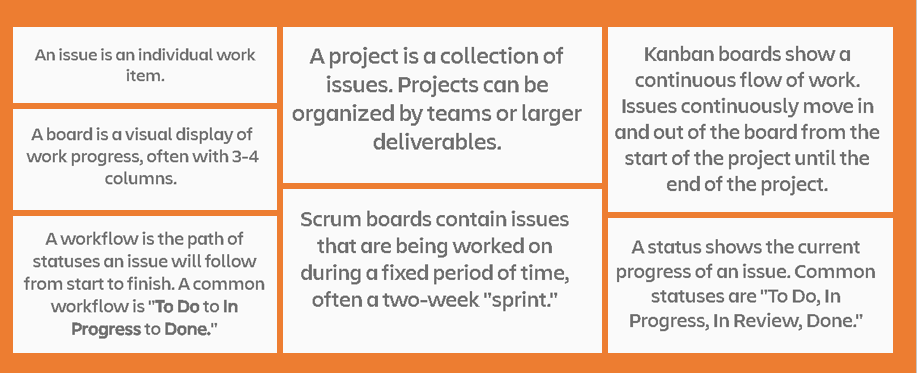
A project is a collection of issues. Projects are named after a major deliverable like Dashboard release. There are two type of Projects: ✔ Team-managed projects are best for smaller, independent teams who want to control their own tasks. ✔ Company-managed projects are designed for teams who want to standardize a way of working across many teams. These are usually for larger teams Wand are maintained by Jira admins.
A board is a visual display of work progress, often with 3-4 columns. Board columns have names at the top representing the status of each issue. For example, statuses could be: To Do, In Progress, In Review, Done. Statuses are customized by each team depending upon the industry. Note that a project can have multiple Boards.
Workflows & Status
- Workflow is path of statues, an issue will follow from start to finish. When you track the action items, you commonly use the Open, In Progress, Closed. An action item will flow between these statuses.
- The status fields like To do, In Progress, Open, closed, Resolved, Approved shows the current progress of an issue.
Issues & its Types
Issues represents an individual work item. There are different issue types which are organized into a hierarchy based on the size and category of work. Let’s see one by one.
Epic
Story
Task
Sub-task
Bug
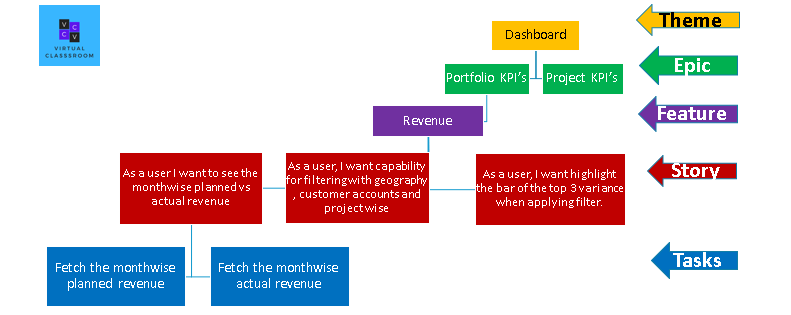
1.An epic is a large initiative. Known as “parent” issues, epics contain smaller issues within them. They often represent big chunks of work that can be broken down into smaller tasks. It will be up us to decide how to define the epic.
2.A story is a feature or requirement from the user’s perspective. Stories are commonly used by software development teams. It is important to define work items in non-technical language for ease of understanding. For example, “As a user, I need a sign-in option in the dashboard.” Stories are at the same hierarchical level as tasks.
3.A task is the most common issue type. They contain a more detailed description of a work item. Tasks can exist within a larger epic or exist all on their own.
4.A subtask is a further defined issue, used to break down tasks, stories, or bugs into smaller work items. Subtasks must have a parent issue type. They cannot exist on their own.
5.A bug describes a problem or error, mostly used in software development teams. They can exist within a larger epic or exist all on their own.
In the Part- 2, I will be sharing the tips and strategies in using Jira which I learnt from one of the Jira Tutorial session for more productivity.
Discover more from LR Virtual Classroom
Subscribe to get the latest posts sent to your email.
 LR Virtual Classroom
One thought on “Jira in Layman Terms”
Comments are closed.