
Most of the time, we would like to have opinion of team members after a occasion. Yes, I’m talking about the internal feedback surveys. I came across a simple mail survey to collect the responses with just using the outlook.
Things to know:
- This is not the option of Yes or No voting that you have in Outlook
- With this way, you can set up to collect responses to any mail id not just the one who set it up.
- This is not anonymous survey as the team members will use outlook mail directly to reply to the survey.
Lets get started
- First create a template as below. You can be as creative as you want to be.
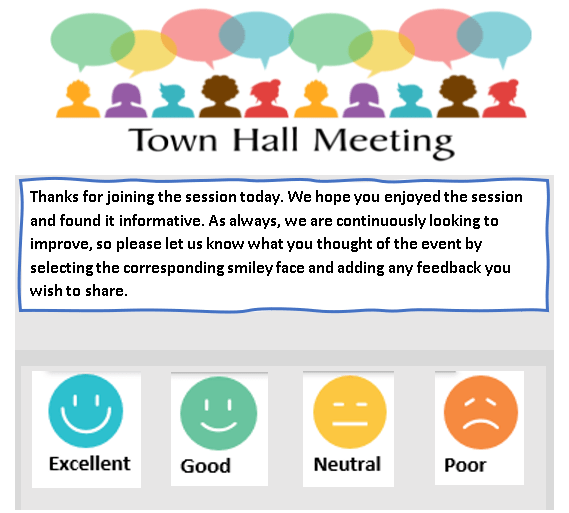
2. Then right click on the first smiley, enter the details as shown below screenshot: Format – mailto:get.together@xxx.com?cc=yourname@xxx.com
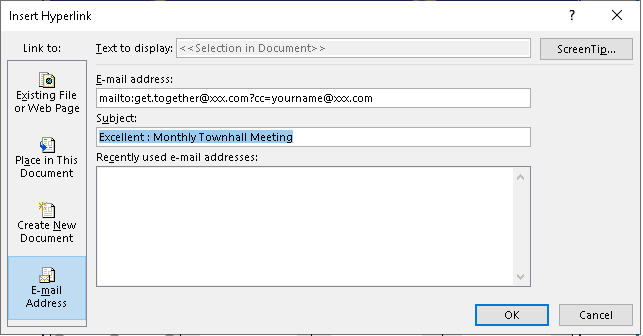
3. Similarly do for all the four smileys as shown below:
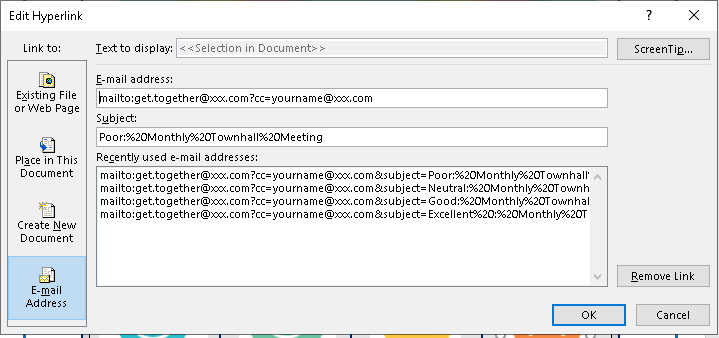
4. Once done, send yourself a test and check if all the smileys link works.
5. Provided everything is okay, send the survey to the audience and bcc them in.
6. You can segregate the mail responses received based on subject and do a easy counting.
Hoila, easy and elegant feedback survey created & collected in no time 🙂
Other options for initiating survey:
There are various online sites for conducting the surveys like listed below: They enable to use PowerPoint presentation, Microsoft Teams, Zoom, WebEx and other common communication tools to conduct the surveys. Each communicators have now enabled the polling option for ease.
- Survey Monkey – Easily create surveys, quizzes, and polls for any audience.
- Menti – Use live polls, quizzes, word clouds, Q&As and more to get real-time input – regardless if you’re remote, hybrid or face-to-face
- Slido – Engage with live polls, word cloud, better Q&A sessions & Quizzes.
- Kahoot – Create Learning games, deliver training, presentations, meetings and events in-person or on any video conferencing platform.
- Vevox is a polling tool which also comes with a PowerPoint add-in to integrate the service in your presentation. Vevox is great for making polling slides for instant feedback from your audience during a Live presentation session. The free account of Vevox is limited to 1500 participants but provides session analytics which can be quite handy for presenters.
Have a HAPPY VIRTUAL HOUR 🙂
Discover more from LR Virtual Classroom
Subscribe to get the latest posts sent to your email.
 LR Virtual Classroom